
Contact

Business Solutions Module

Front Desk AI

The call you could not answer comes back as a structured opportunity — what the customer wants, where they are, how urgent it is, what went unanswered, and one next action waiting for your decision.

Managed Offer · Guided Setup

  • Set up with you, not by signup form
  • Writes into the Client Hub record
  • Owner approves anything consequential
  • Optional module in the toolkit
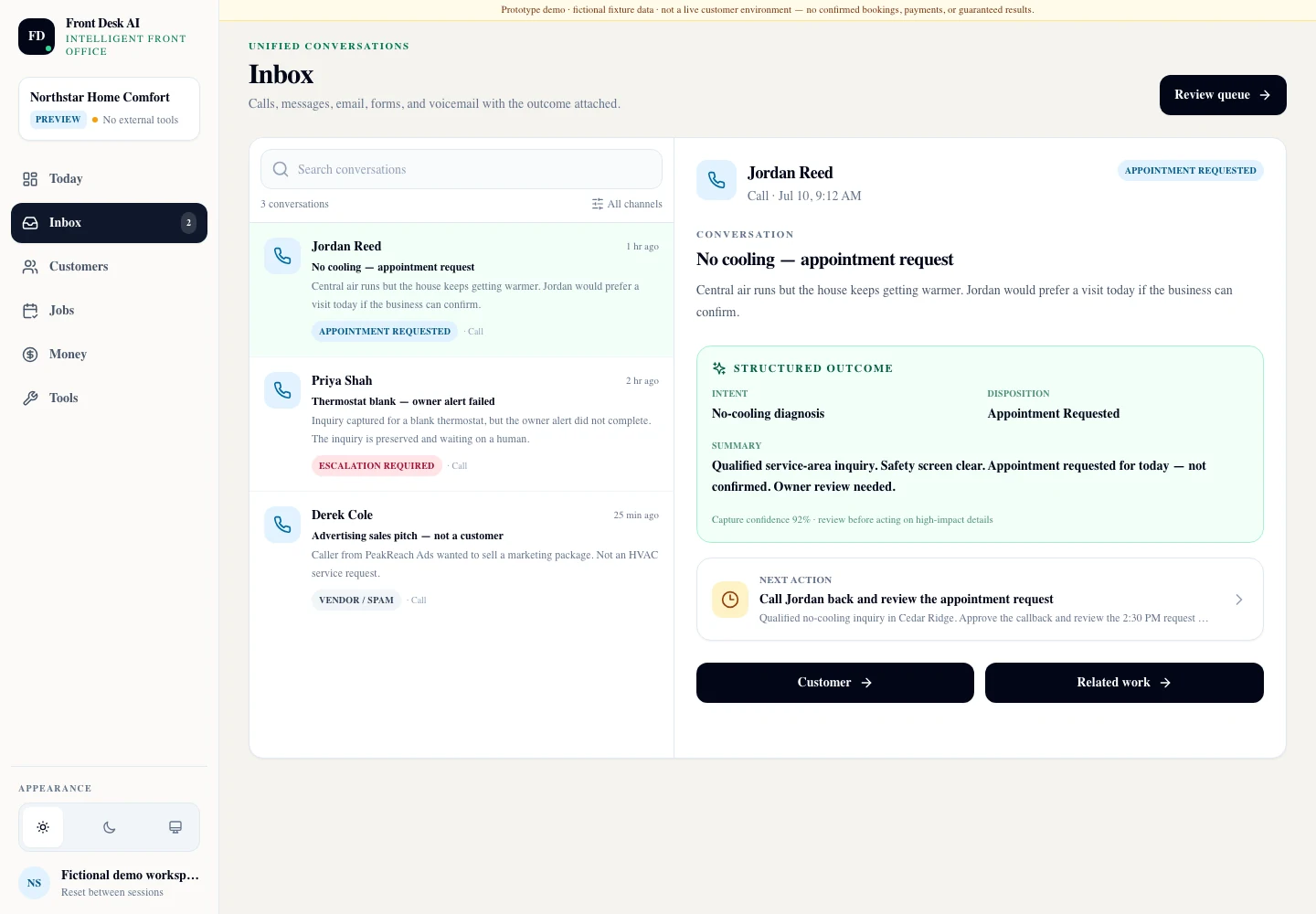
Front Desk AI — Inbox
The Front Desk AI Inbox: three captured conversations listed on the left, tagged appointment requested, escalation required and vendor or spam, beside a structured outcome panel naming the intent, the disposition, a written summary and the recommended next action for the owner.

One call, fully written down. Intent, disposition, a plain-language summary, and a next action that says the appointment was “requested” and is not confirmed. Fictional-data product capture from a private synthetic-data rehearsal workspace — the disclosure across the top of the interface is part of that build, and the sidebar shows no external tools connected. It is not a live customer environment.

02

What it captures

A missed call is not a message. It is an unfinished decision.

Voicemail hands you a recording and a callback you will forget. Front Desk AI hands you a record with the request, the location, the timing, the urgency, the questions nobody answered, and a recommendation you can approve or throw away. Every screen on this page is an exact capture of the same rehearsal workspace running fictional data.

Job — know what to do first

The owner's desk, in priority order

Today opens on the count that matters — what was captured, what needs review, what has escalated — and then lists the actions themselves with a due time and a Review control on each one. The qualified opportunity is deliberately first.

  • Captured, needs-review and escalation counts across the top of the day
  • Next actions carrying an explicit priority and a due time, each opening for review
  • An appointment request held as “requested, pending owner review” rather than booked
  • A quote follow-up shown as a draft that has not been sent, accepted or paid

Boundary The recommendation is a recommendation. Front Desk creates or updates a structured opportunity; it never issues a binding quote, never confirms an appointment the customer merely asked for, and never commits you to work.
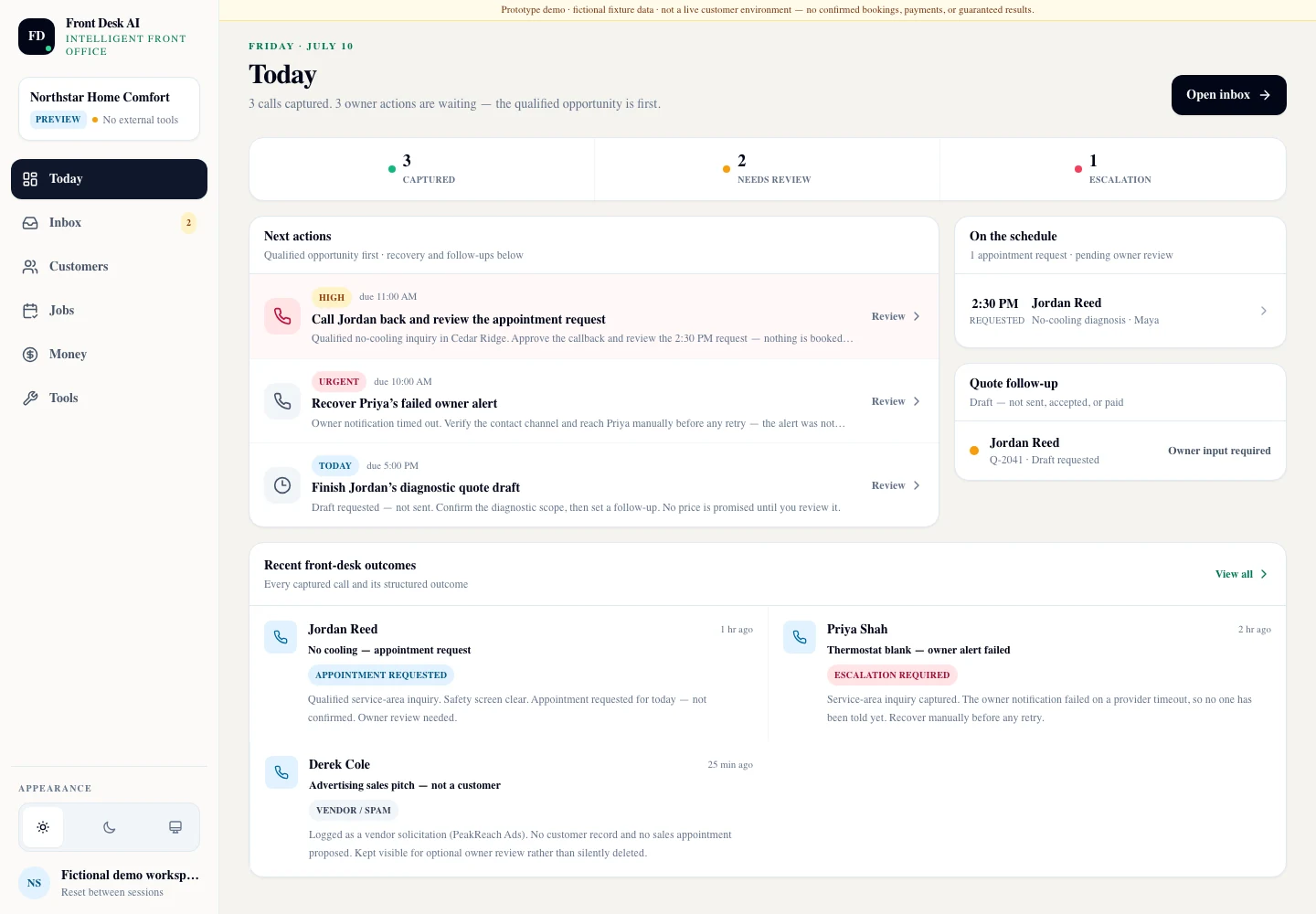
Front Desk AI — Today
The Front Desk AI Today view: counts of three captured calls, two needing review and one escalation, a next-actions list with high, urgent and today priorities and due times, a schedule panel holding an appointment request as pending owner review, and a quote follow-up marked draft, not sent, accepted or paid.

Fictional-data product capture from the same private synthetic-data rehearsal. The failed owner alert is visible, not hidden. When the notification to the owner did not complete, the inquiry stayed preserved and became an urgent recovery task with a human named on it — the escalation is a first-class item on the desk.
Job — keep the customer

The record outlives the phone call

The call does not stop at a transcript. The customer becomes a durable record in Client Hub with their address, their tags, their conversations, their work and their history — so the second call already knows about the first one, whoever picks it up.

  • One dossier per customer: people, conversations, work, documents and money
  • Current work shown with its stage and an explicit “pricing not set” state
  • Intake documents attached to the customer and marked as needing review
  • An activity trail recording what the software did and what it left for a person

Boundary Client Hub is the shared record layer for the whole toolkit, not a Front Desk feature. Switching Front Desk off later does not delete the customers or the history it wrote.

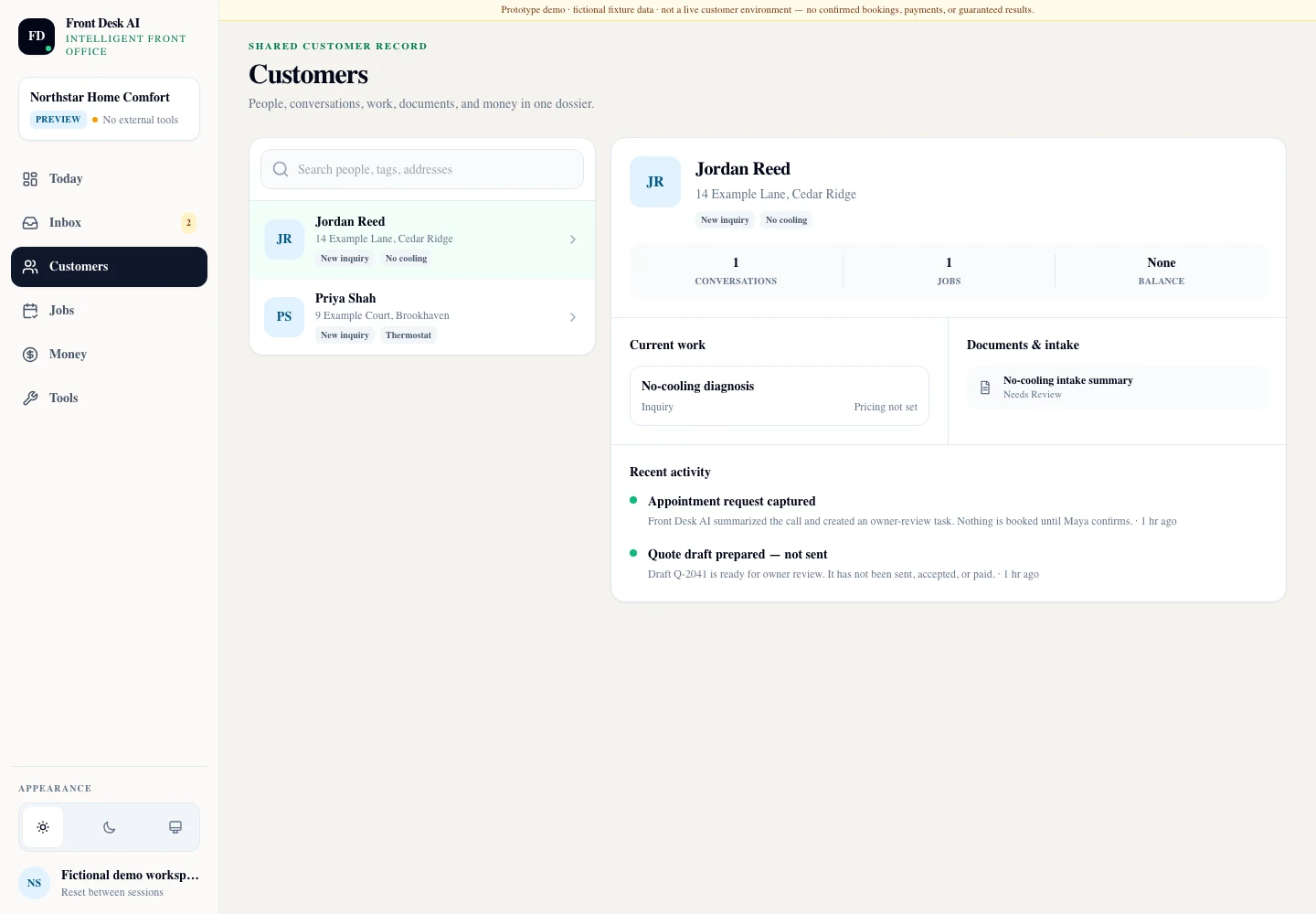
Front Desk AI — Customers
A Front Desk AI customer dossier: a searchable people list on the left and, on the right, one customer with their address and tags, counts of conversations and jobs, a current-work card reading pricing not set, an intake document needing review, and a recent activity trail noting the captured appointment request and an unsent quote draft.

Fictional-data product capture from the same private synthetic-data rehearsal. The activity trail states the limits in the product itself — the call was summarised, an owner-review task was created, nothing is booked until a person confirms, and the quote draft has not been sent, accepted or paid.

03

The safe loop

Capture, structure, surface — then wait for you

The loop is deliberately short of the commitment. Everything up to the decision is automated; the decision itself is not.

  1. 01

    Capture

    An inbound call that would otherwise have become voicemail is answered and captured as a conversation with its channel and its timestamp.

  2. 02

    Structure

    The conversation becomes an intent, a disposition, a summary and the specific details a service business needs — what is wrong, where it is, and how soon it matters.

  3. 03

    Qualify honestly

    A sales pitch is logged as a vendor solicitation rather than becoming a fake customer. What the caller did not answer is written down as an open question instead of being invented.

  4. 04

    Connect

    The customer, the opportunity and the job are created or updated in Client Hub, so the record is one thread rather than a copy in another tool.

  5. 05

    Surface for decision

    A recommended next action appears on the owner's desk with a priority and a due time. If a notification fails, the failure becomes its own visible task.

Built for

  • Owner-operators whose phone rings while both hands are already busy
  • Service businesses losing work to voicemail rather than to competitors
  • Small teams who need one shared answer to “who was that, and what did they want?”
  • Anyone whose follow-ups currently live in a notebook, a text thread and a memory

What it never does

  • It does not issue a binding quote or quote a price on your behalf
  • It does not confirm an appointment the customer only requested
  • It does not commit you to work, to a date or to a cost
  • It does not send anything commercial without an owner decision
  • It is optional — the rest of the toolkit does not require it

04

Interface bench

Where the work goes next, and how it reads on a phone

Two more captures from the same rehearsal workspace: the pipeline the captured inquiry moves through, and the same structured inbox at true phone width.

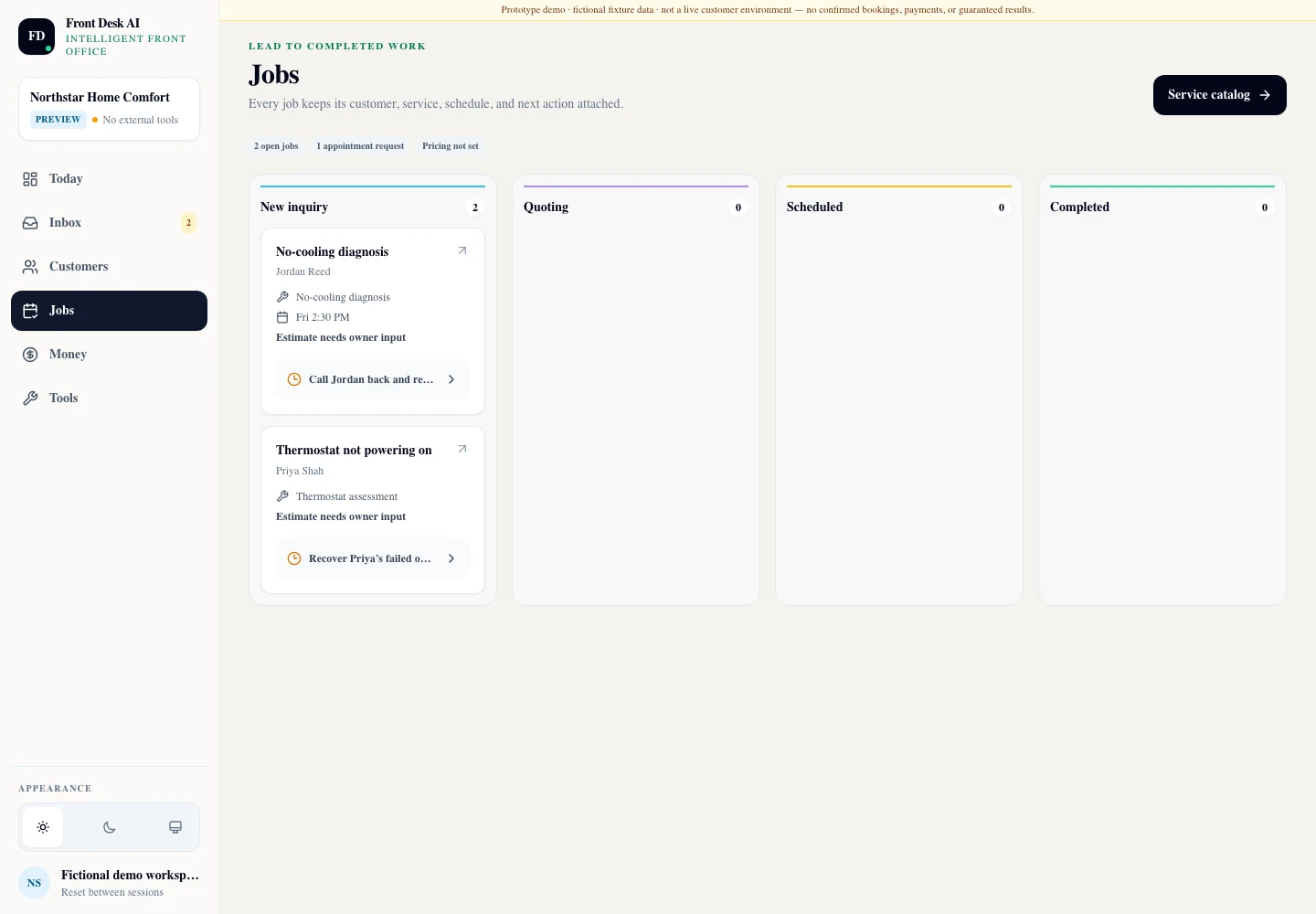
Front Desk AI — Jobs
The Front Desk AI Jobs board with four columns for new inquiry, quoting, scheduled and completed work; two cards sit in new inquiry, each naming the customer, the service and its next action, and each marked estimate needs owner input, while the other three columns are empty.

Fictional-data product capture from the same private synthetic-data rehearsal. Both open jobs read “estimate needs owner input”, and the quoting, scheduled and completed columns are empty — the software moved the inquiry into the pipeline and stopped exactly where a human decision belongs.

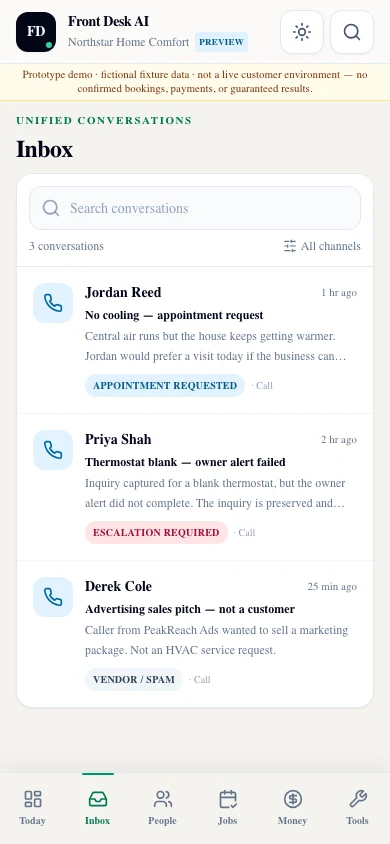
Front Desk AI — 390 px
The Front Desk AI inbox at phone width, showing the workspace header, the fictional-fixture-data disclosure, three captured conversations with their status tags and summaries, and a bottom navigation bar for today, inbox, people, jobs, money and tools.

Fictional-data product capture from the same private synthetic-data rehearsal, at a true 390 px phone viewport. The structured outcome survives the small screen — the same three conversations, the same status tags, and a navigation bar sized for a thumb rather than a mouse.

Every image on this page is an unedited capture of the current build running fictional fixture data in a private rehearsal workspace. Nothing here is a paying customer, a live phone account or a production deployment, and no interface state has been manufactured for marketing.

05

Plans and setup

Priced plainly, started deliberately

Managed Offer — Guided Setup

Front Desk AI is available through guided managed setup.

This is not a self-service signup. The number, the greeting, the questions worth asking, the escalation path and the way an outcome should reach you are configured with you before anything answers a call, and the interfaces on this page are captures of a private rehearsal workspace rather than a live account.

The published plans below are the whole commercial position. There is no other tier, no bundled add-on and no separate charge hiding behind the setup.

Published plans
Plan Price What it includes
Core $149/month 300 minutes included each month.
Growth $299/month 800 minutes included each month.
Guided setup $249 once One-time configuration and rehearsal of the desk with you.
Overage $0.40/minute Applies only beyond the minutes included in your plan.
  • Client Hub is included with an active paid module, so the customers and history Front Desk writes stay yours.
  • The first conversation is a scoping call, not a tour — what happens to your calls today, and what a good outcome would have looked like last week.
  • We say plainly what is not ready rather than quoting a plan that does not fit.
Delivery
Guided managed setup and configuration. Not a self-service product you switch on alone.
Authority
Creates or updates a structured opportunity. Quotes, bookings and commitments stay with the owner.
Record
Customers, opportunities, jobs, tasks, notes and activity live in the shared Client Hub record.
Evidence state
Every interface on this page is a capture of a private rehearsal workspace running fictional data.