Contact

Business Solutions Module

InvoicePack

The agreement, the receipts and the invoice belong to the same job — so build the invoice from what the agreement actually says, on your own machine, without retyping any of it.

Private Validation — Local-First Candidate

  • Local vault on your own Mac
  • Raw sources preserved byte-for-byte
  • Every fact accepted by a human
  • Backup, restore and packet export
InvoicePack — Project vault
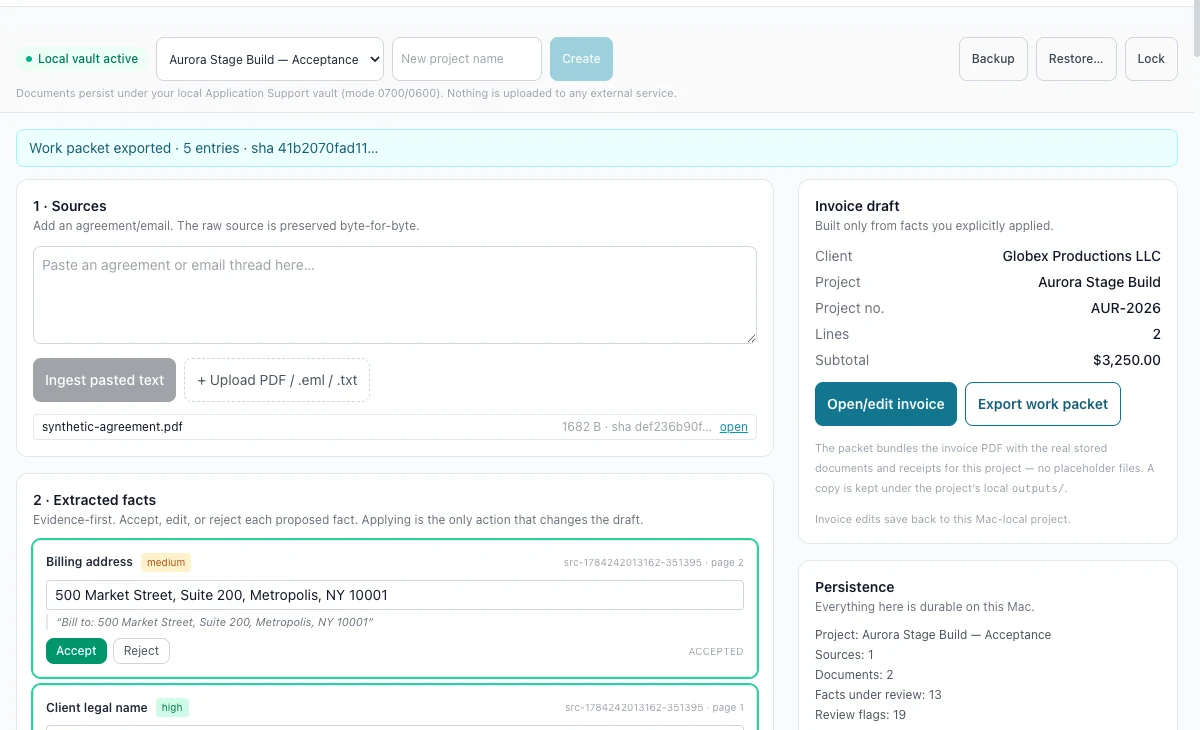
The InvoicePack project workspace after a work packet export: a local vault header with project selector and backup, restore and lock controls, a confirmation banner naming the exported packet, its entry count and a content hash, a sources panel holding one ingested agreement, an extracted-facts list with accept and reject controls, and a right-hand invoice draft and persistence summary.

A work packet exported, and everything still on the machine. The header states the vault is active and holds backup, restore and lock controls; the banner in this state names the exported packet, its entry count and a content hash. Cropped from the exact synthetic local-vault runtime evidence — the project, the agreement and the client are invented for validation.

02

Evidence first

Nothing reaches the invoice until you accept it

Most invoicing tools start with an empty form and ask you to remember the agreement. InvoicePack starts with the agreement, proposes each fact with the sentence it came from, and changes the draft only when you apply what you accepted. Every image on this page is cropped from the same exact synthetic local-vault runtime evidence.

Job — stop retyping the contract

Each proposed fact carries its own citation

Extracted facts arrive one at a time with a confidence weighting, the quoted sentence they came from and the page it sits on. You accept, edit or reject each one, and applying the accepted set is the only action that touches the invoice draft.

  • Billing address, client legal name, receipt requirements and invoice schedule proposed separately
  • Every proposal quoting its source sentence and page rather than asserting a conclusion
  • Accept, edit or reject per fact, with decisions saved before anything is applied
  • Contract attention flags raised deterministically with the clause they refer to

Boundary The review flags are prompts, not legal advice. The interface states it plainly: they are points to raise, not conclusions, and they do not replace a lawyer reading your agreement.
InvoicePack — Accepted facts
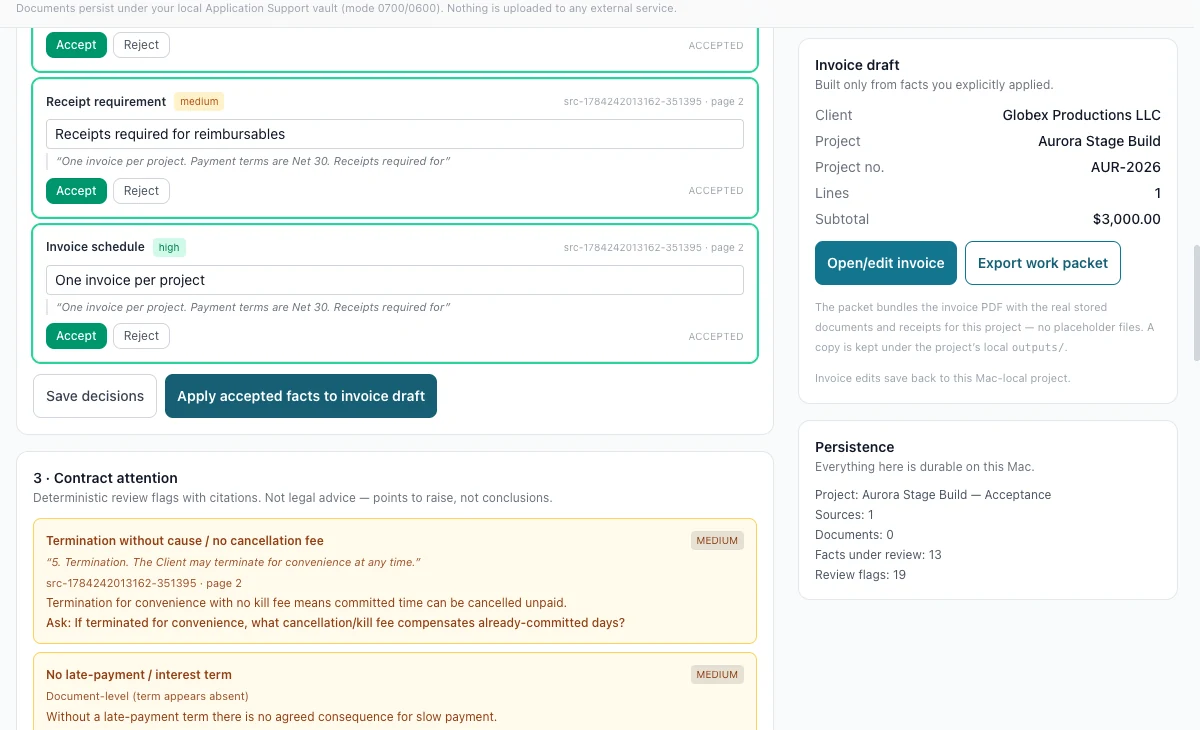
InvoicePack fact review: accepted receipt-requirement and invoice-schedule facts, each quoting the sentence and page it came from, above controls to save decisions or apply the accepted facts to the invoice draft, with a contract-attention list flagging a termination clause and a missing late-payment term, and an invoice draft panel on the right stating it is built only from applied facts.

Cropped from the exact synthetic local-vault runtime evidence. Two facts accepted, and the draft still untouched until “Apply accepted facts to invoice draft” is pressed — while the attention panel asks what a termination clause with no cancellation fee would cost in already-committed days.
Job — get the money right

Rates you keep, edits that stay on one invoice

Work is billed from saved rate profiles and presets. Tapping a preset adds a line, and repeating it adds another line rather than quietly merging — and a rate you change on this invoice never rewrites the preset you saved.

  • Rate profiles and presets managed once, then reused per project
  • Line items with their own unit, quantity and rate, each one removable
  • Explicit switches for whether a line counts toward total time and whether it is taxable
  • The live document recomputing lines, subtotal and total time as the work changes

Boundary Arithmetic, persistence and export were exercised against synthetic projects during private validation. This is not an accounting, payroll or tax system, and it does not file anything on your behalf.

InvoicePack — Work and preview
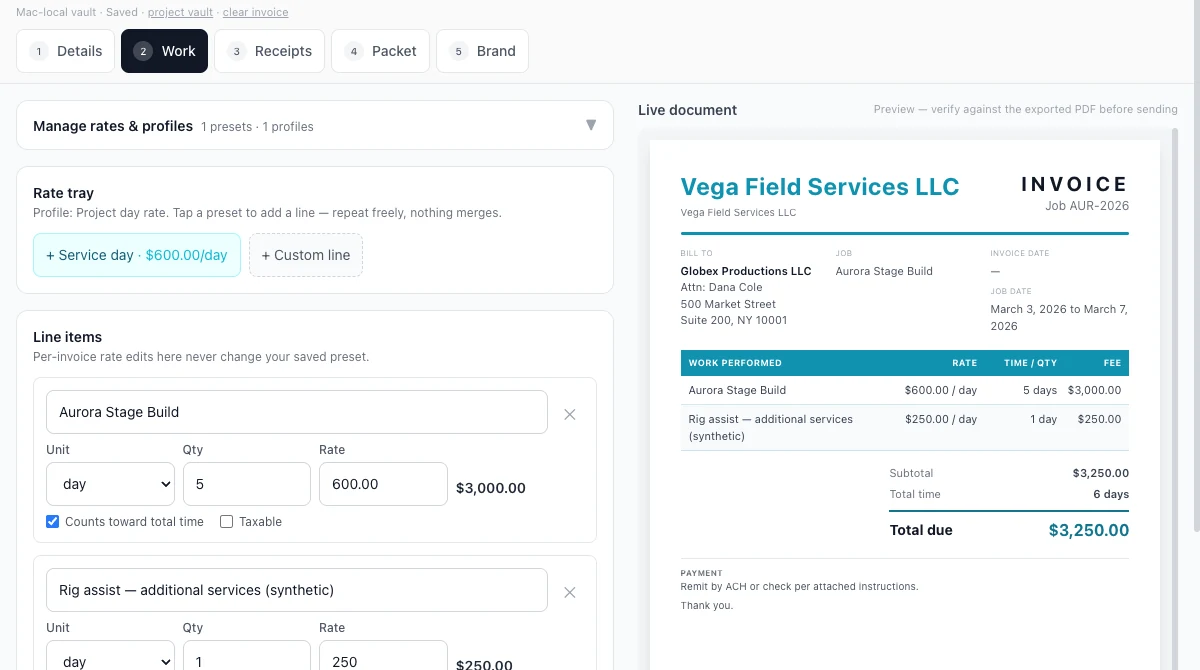
The InvoicePack work step: a numbered tab row for details, work, receipts, packet and brand, a rate tray offering a saved day-rate preset and a custom line, two line items with unit, quantity and rate fields plus counts-toward-total-time and taxable switches, and a live invoice preview on the right showing both lines with their rate, time and fee columns and a recomputed subtotal and total.

Cropped from the exact synthetic local-vault runtime evidence. A second billable line added, and the document already agrees. The header confirms the project saved to the local vault, and the panel states that per-invoice rate edits never change the saved preset.

03

The safe loop

Ingest, review, apply, then export the packet

The loop keeps the source of truth and the paperwork in the same place, so what you send is traceable back to the sentence it came from.

  1. 01

    Ingest

    Paste an agreement or email thread, or add a PDF or message file. The raw source is preserved byte-for-byte inside the local project vault.

  2. 02

    Review the evidence

    Work through the proposed facts with their citations, accept or reject each one, and read the attention flags raised against the contract language.

  3. 03

    Apply to the draft

    Applying the accepted set is the only action that changes the invoice draft, so the draft never contains a fact nobody approved.

  4. 04

    Build the work

    Add billable lines from your rate profiles, set what counts toward total time, and watch the live document recompute as you go.

  5. 05

    Export and keep

    Export a work packet bundling the invoice with the stored documents and receipts for that project, and keep a copy in the project's own local output folder.

  6. 06

    Back up and lock

    Back up the vault, restore it, or lock it — all against a store that lives under your own user account with owner-only permissions.

Built for

  • Owner-operators who invoice against a signed agreement rather than a template
  • Anyone whose receipts, contract terms and invoice currently live in three separate places
  • Work where the client will ask what a line item was for, months later
  • People who would rather their contracts and receipts never left the machine

Stated limits

  • Raw agreements, receipts, tax and payment documents, PDFs and packet contents stay local by default
  • Only the minimum structured status is intended to flow back to Client Hub — that handoff is not built and accepted yet
  • Validation has been exercised with synthetic projects, never with real sensitive documents
  • There is no public distribution, no signed or notarised build claim, and no self-service release
  • The exercised build is a Mac-local application; no native Windows build is claimed

04

Interface bench

What the client receives, and what the phone shows

Two more views cropped from the same exact synthetic local-vault runtime evidence: the document the client would actually read, and the vault at true phone width.

InvoicePack — Live document
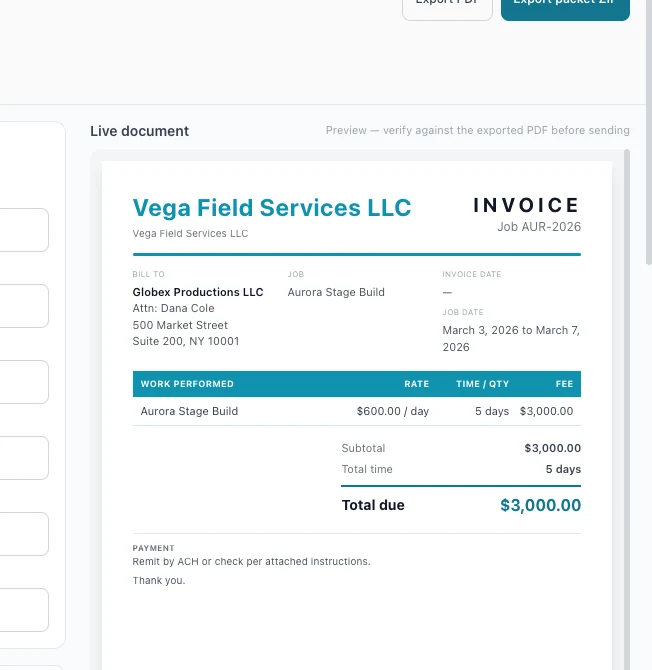
The InvoicePack live document preview: a neutral invoice with the issuing business name, a job number, bill-to and job blocks, an unset invoice date, a job date range, a work-performed table with rate, time and fee columns, a subtotal, a total time in days, a total due, and a payment note about remitting by transfer or cheque.

Cropped from the exact synthetic local-vault runtime evidence. The output is branded, plain and checkable. The preview labels itself as a preview to verify against the exported PDF before sending, and the invoice date stays unset until the document is issued.

InvoicePack — 390 px
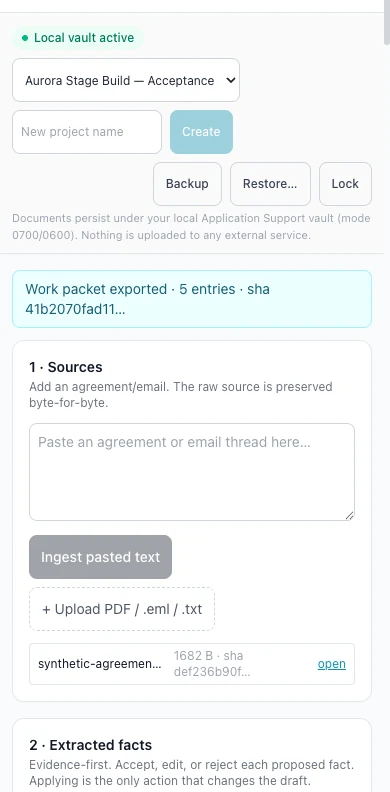
The InvoicePack vault at phone width: a local vault active marker, the project selector with create, backup, restore and lock controls stacked for a narrow screen, the local storage disclosure, the exported work packet banner, the sources panel with its ingest controls and stored agreement, and the beginning of the extracted-facts step.

Cropped from the exact synthetic local-vault runtime evidence, at a true 390 px phone viewport. The local-storage statement stays visible on the small screen, along with the vault controls and the same evidence-first sources step.

Every image on this page comes from one exact run of the current build against a synthetic project in a local vault. No real client, agreement, receipt or payment document was used, and no interface state has been manufactured for marketing.

05

Status

A local-first candidate, honestly described

Private Validation — Local-First Candidate

InvoicePack is under private validation, not on public release.

The build shown here is a local-first candidate. Its evidence review, accepted facts, invoice drafting, arithmetic, local persistence, packet export and backup and restore have all been exercised end to end — against synthetic projects, on one machine, by a person watching every step.

What has not happened matters just as much: there is no public distribution path, no signed or notarised build claim, no self-service release, no published price, and no workflow that puts your sensitive documents in someone else's cloud. Nothing on this page should be read as an availability date.

  • Exercised in validation: source ingest with byte-for-byte preservation, cited fact review, applied-fact drafting, rate profiles and line arithmetic, local persistence, work-packet export, backup and restore, and the true-phone layout.
  • Not claimed: production readiness, self-service purchase, a distribution channel, a completed Client Hub handoff, or any use with real sensitive documents.
  • If this is your problem — invoicing against real agreements, with receipts you cannot afford to scatter — that is exactly the workflow being validated, and it is worth a conversation.
Platform
Mac-local application. The exercised build stores its vault under the user's own application support directory with owner-only permissions.
Data boundary
Agreements, receipts, generated documents and packet contents stay on the machine. The interface states that nothing is uploaded to an external service.
Outputs
Invoice PDF, a work packet bundling the stored documents and receipts for the project, and a vault backup that can be restored.
Release state
Private validation. Distribution, signing, licensing, support and commercial terms are all undecided.