Contact

Production Tool

CuePack

Turn an incoming schedule into matched venues, decided quote lines, pack-ready cases, a reviewed freight plan and the calls each role needs on show day.

In Development · Private Workflow Validation

  • Schedule & venue intelligence
  • Quotes → gear → cases → movement
  • Truck · air · sea planning
  • Production & crew role views
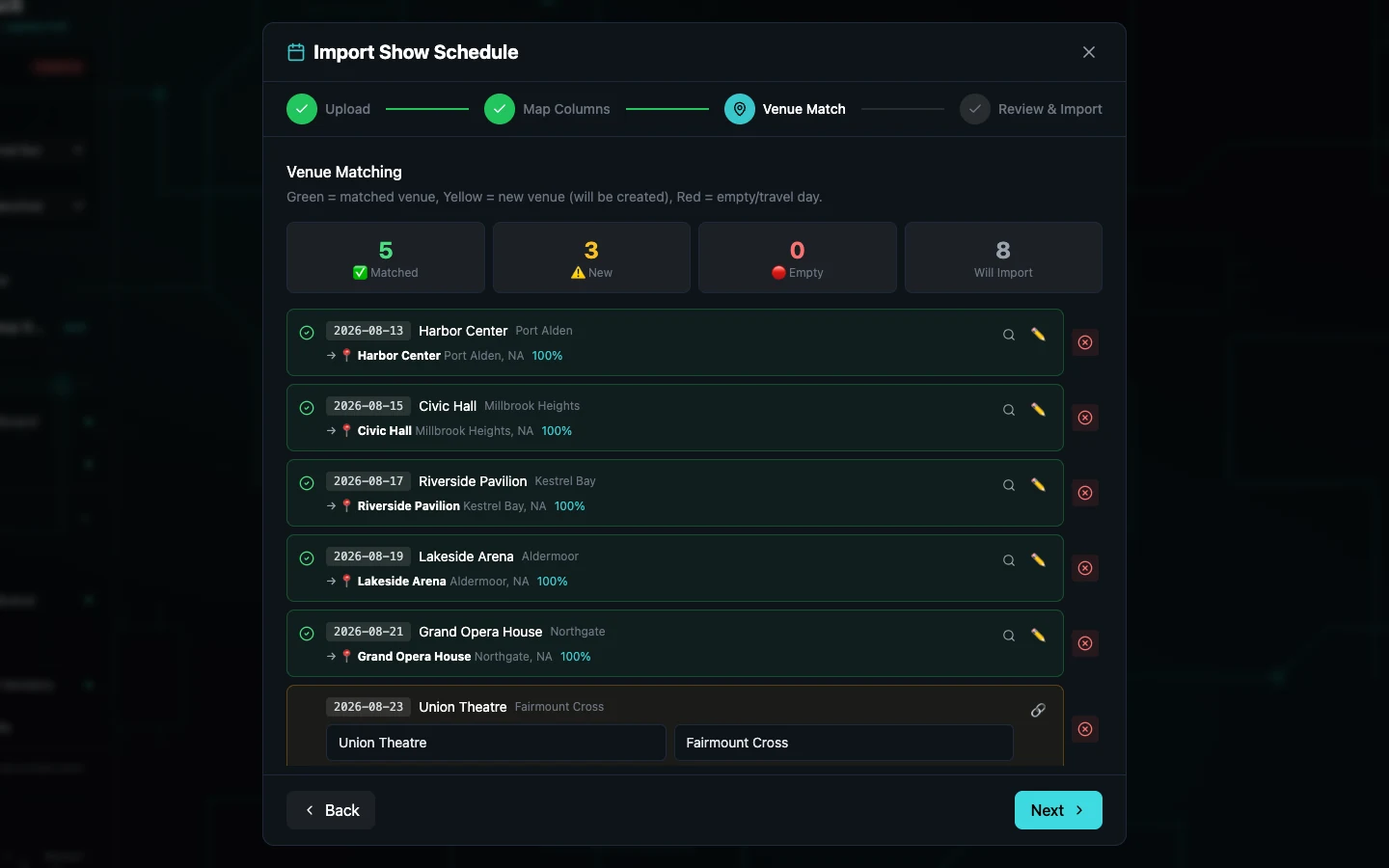
CuePack — Schedule Import / Venue Match
CuePack's Schedule Import Wizard at the Venue Match step: eight imported dates are listed, five automatically matched to existing venues and three marked as new venues for review, with the four-step Upload, Map Columns, Venue Match, Review and Import rail visible above.

Five stops matched automatically; three stay reviewable before import. Venue and city signals narrow the likely records, but the production manager can correct every decision. A changed schedule is compared against what is already stored rather than blindly duplicated.

02

Decide what travels

The budget decision becomes a buildable gear system

Vendor lines, production budgets and case-ready gear live in the same operating record. CuePack can expose the trade-off and prepare the next step; the winner and the final package remain human decisions.

Job — compare the package against the plan

Three lighting categories, two vendors, one visible budget impact

The comparison view puts coverage, weekly totals and the production budget in one decision surface. Each vendor can win individual lines, but no quote is silently accepted and no undecided package turns itself into inventory.

  • Both vendors cover all three compared categories
  • Per-line best values and weekly totals remain visible together
  • Budget impact reports the remaining planning basis for each option
  • Select Winner controls keep commercial responsibility with the production

Boundary These are rounded internal-production fixture amounts, not CuePack pricing, an approved purchase order or a financial forecast.
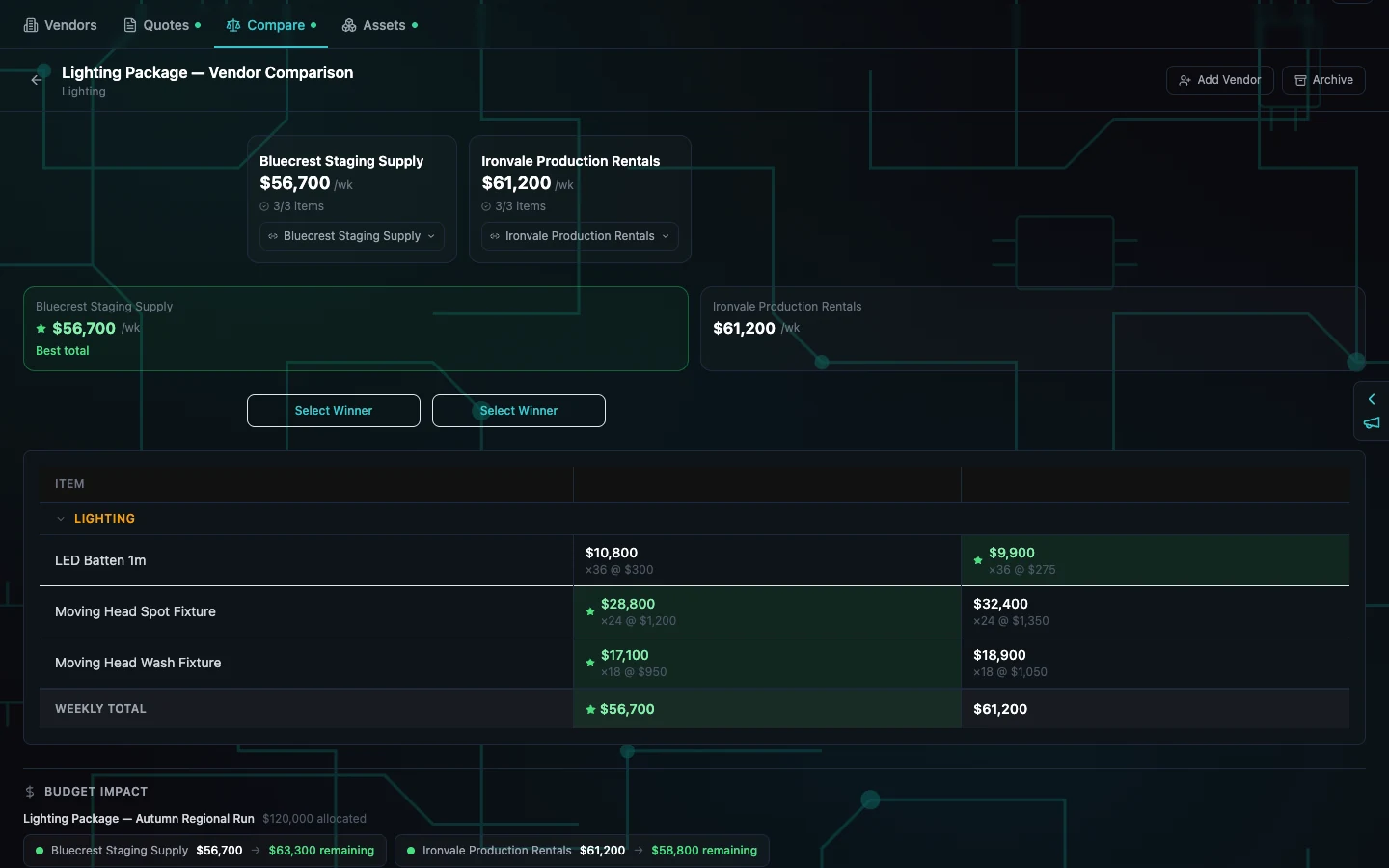
CuePack — Quote Comparison / Budget Impact
CuePack's Lighting Package vendor comparison with Bluecrest Staging Supply at 56,700 dollars per week and Ironvale Production Rentals at 61,200 dollars per week, three of three compared items, Select Winner controls, item-by-item totals, weekly totals and a 120,000 dollar Budget Impact section showing 63,300 and 58,800 dollars remaining.

The money and the consequence are visible before anyone chooses. Bluecrest leaves 63,300 dollars of the fixture planning basis; Ironvale leaves 58,800. The green cells identify lower quoted lines, not an automatic purchasing decision.
Job — turn decided items into physical units

Gear records become cases, racks and trunks with real limits

Once a winner is resolved, CuePack's explicit Push to Pack path can create canonical gear records without duplicating an item already materialised. The build workspace then assigns that gear into dimensioned containers and keeps unresolved items in plain sight.

  • Owned and vendor-supplied gear can share the same package workspace
  • Case type, dimensions, weight, rack units and fill remain editable
  • Unassigned items stay flagged until a real container is chosen
  • Case manifests create physical pack-ready units for movement planning

Boundary The build frame is a separate exact-runtime fixture from the quote frame. It demonstrates the next product surface, not a claim that the pictured quote was purchased.

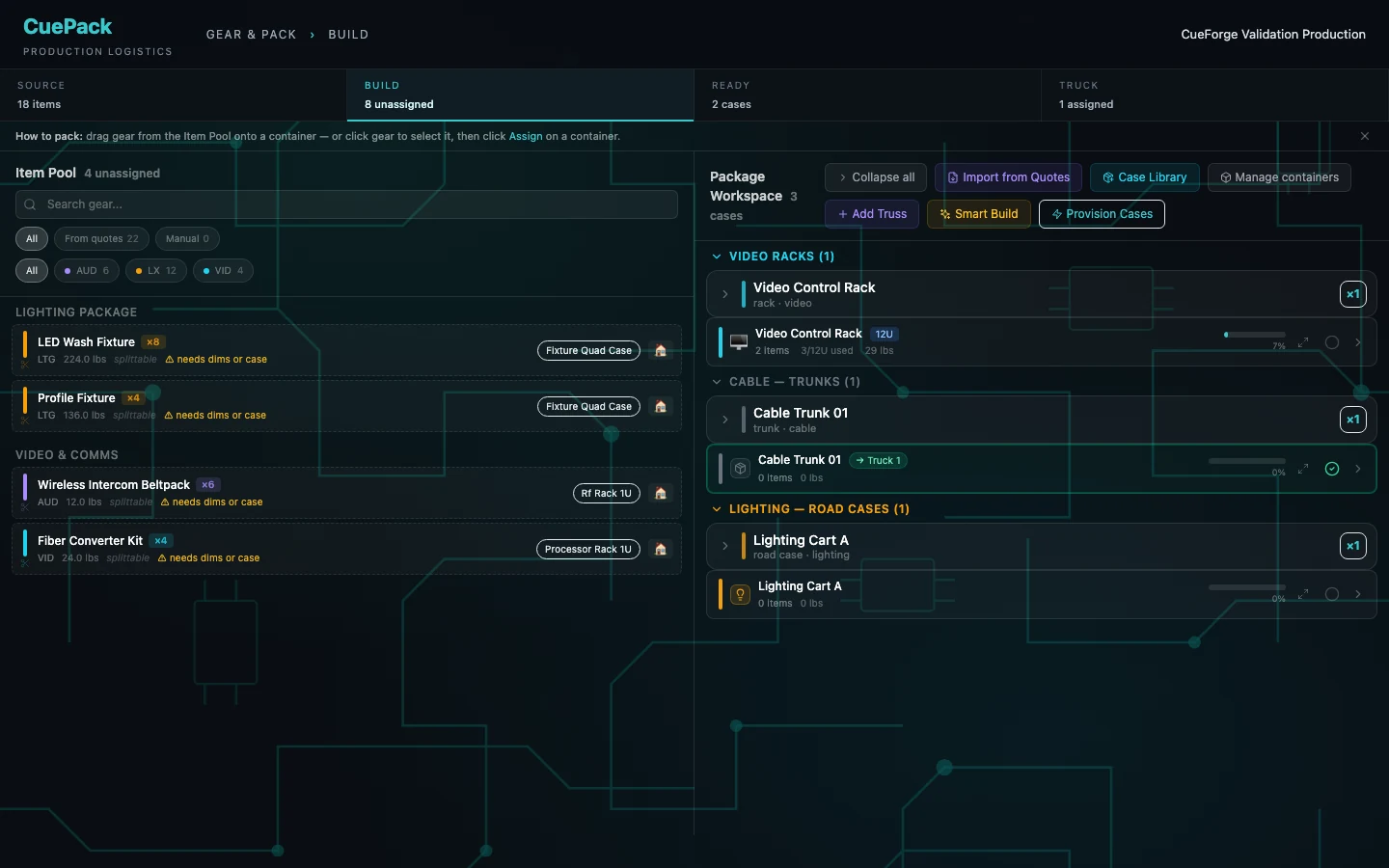
CuePack — Build Workspace
CuePack's Build workspace with a source item pool on the left and a package workspace on the right: lighting and video gear show quantities, departments, weights and needs-dimensions-or-case warnings, while video racks, cable trunks and lighting road cases show rack units, item counts, weights and fill percentages.

Unresolved gear stays unresolved on screen. The source pool explains which items still need dimensions or a case; the package side shows actual containers, item counts, weight and fill instead of treating a quote line as a road case.

03

One production record

From the first date to the first call

CuePack is the operating spine between planning, physical logistics and the day itself. Each stage narrows the same production record instead of beginning another spreadsheet.

  1. 01

    Import

    Bring in the schedule and map its date, city and venue columns.

  2. 02

    Match

    Resolve each stop against the venue database and review every new place.

  3. 03

    Decide

    Compare vendor lines against the production budget and choose deliberately.

  4. 04

    Build

    Materialise decided gear, case it, group it and keep exceptions visible.

  5. 05

    Move

    Choose truck, air or sea and review the editable pack before release.

  6. 06

    Run

    Publish the calls and show each role only the operating view it needs.

Built for

  • Production managers carrying a tour from advance through show day
  • Rental and shop teams turning decided gear into repeatable case packs
  • Logistics leads comparing truck, air and sea movement
  • PA and crew teams working from role-bounded calls and venue facts

Outside its authority

  • It does not purchase a vendor package or approve a budget automatically
  • It is not a freight broker, carrier booking system or customs filing service
  • It does not replace a weight certificate, axle check or legal load inspection
  • LED surface design belongs in CuePatch; settlement stays with finance tools

04

Choose the movement

One case system, three ways across the map

Truck, air and sea are real Pack Planner modes, not marketing cards. The container changes; the cases, groups, dimensions and human review stay attached to the same production.

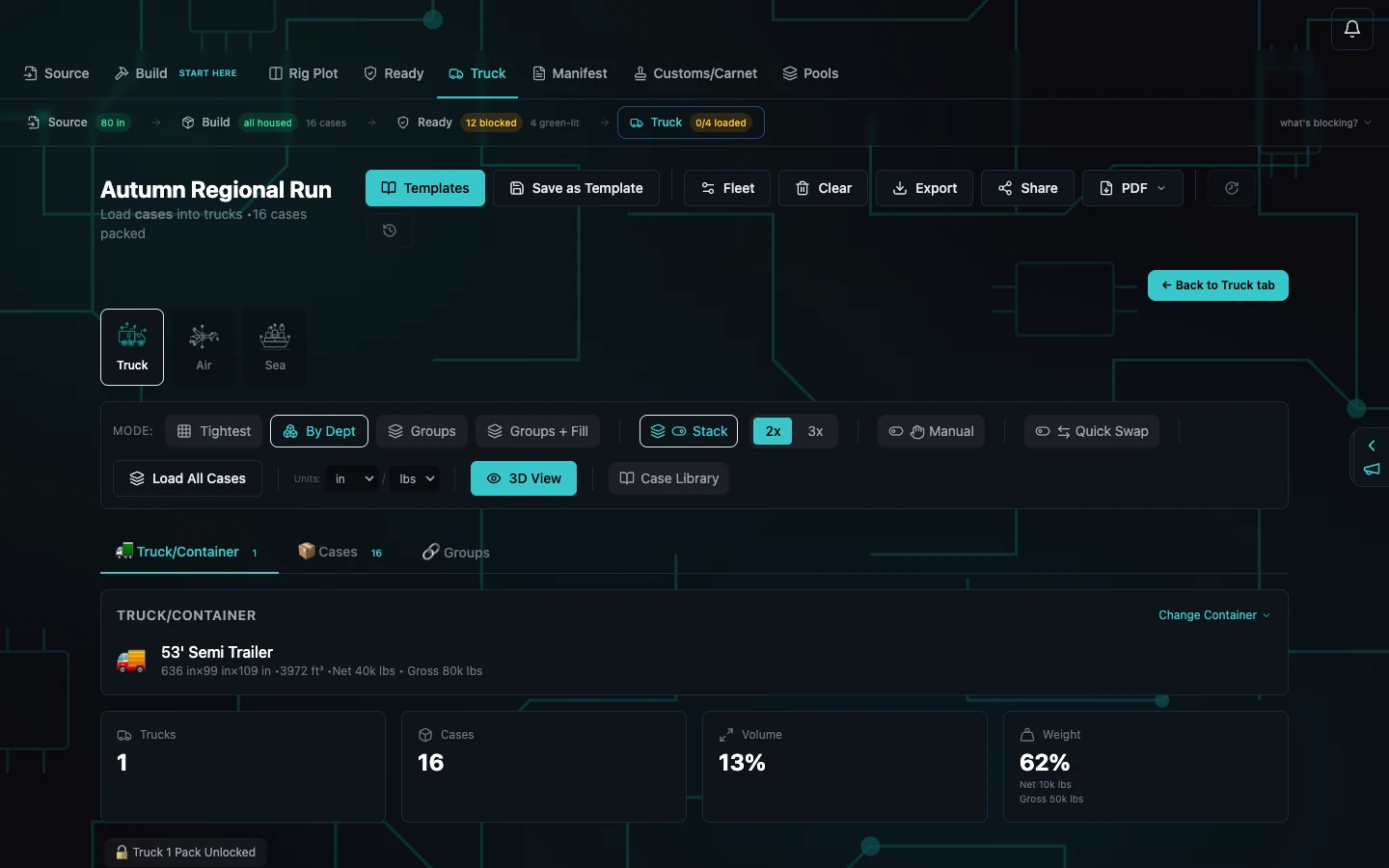
CuePack — Multimodal Pack Planner
CuePack's Pack Planner showing Truck, Air and Sea movement modes, By Department grouping, stack and manual placement controls, a 16-case package, one selected 53-foot semi trailer and cards reporting one truck, 16 cases, 13 percent volume and 62 percent weight.

Truck, Air and Sea change the movement model without discarding the case plan. This fixture has 16 cases assigned to containers; the selected 53-foot trailer shows the weight and volume consequences while grouping, stacking and manual placement remain editable.

CuePack — Group-aware 3D Pack
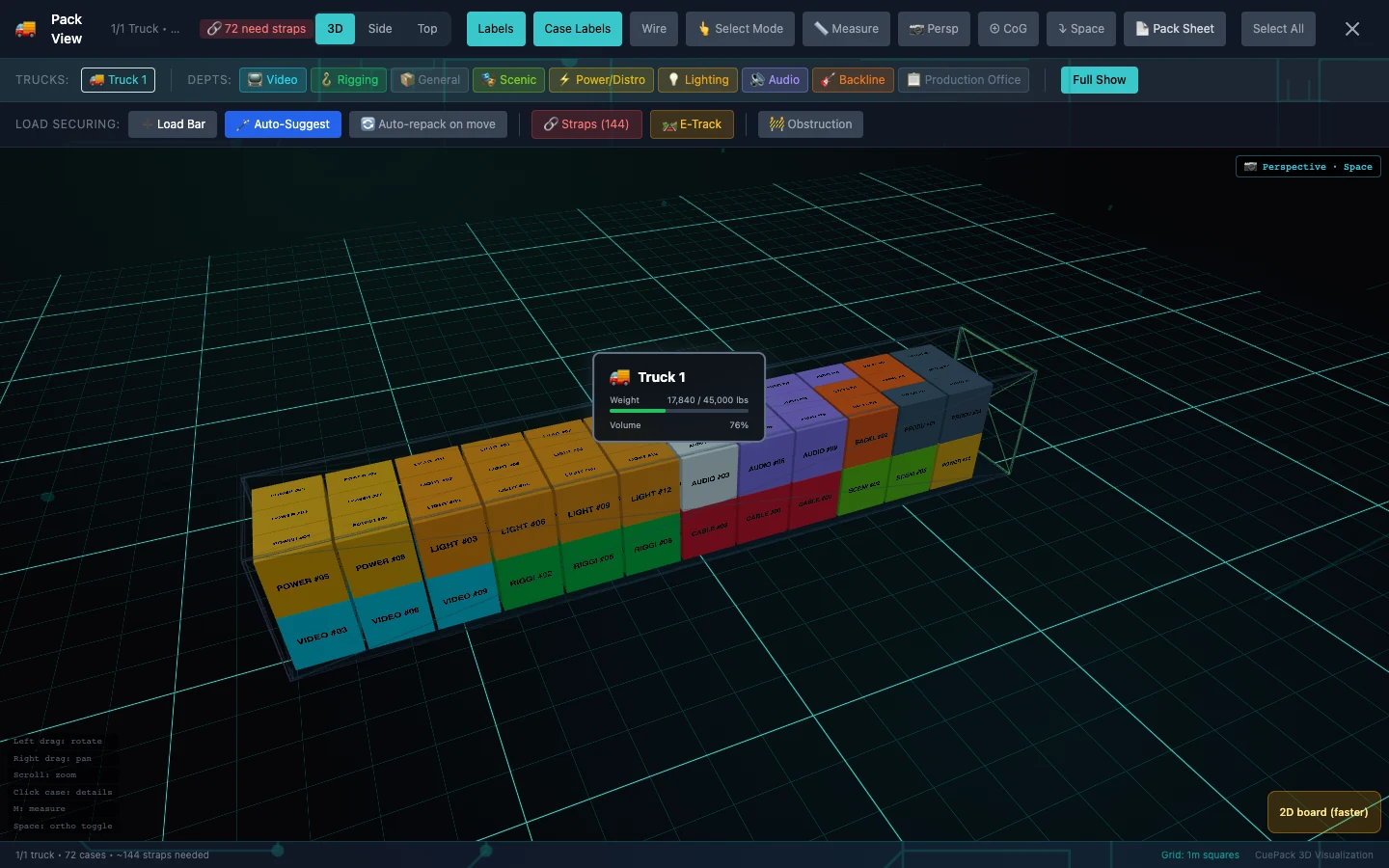
CuePack's populated 3D Pack View showing one 53-foot trailer filled with 72 coloured cases in clean contiguous three-wide rows and two complete layers, reporting 76 percent volume and 17,840 pounds, with 3D, side and top view modes, labels, wireframe, measurement, centre-of-gravity and pack-sheet controls.

A full truck should read like a planned wall, not scattered inventory. This synthetic fixture gives CuePack's real pack worker 72 compatible declared cases; it returns one dense 53-foot trailer with 12 complete three-wide rows across two layers. The result remains an editable draft—not a weight certificate, axle check or legal load inspection.

The two movement images are separate public-safe exact-runtime fixtures. They demonstrate distinct Pack Planner surfaces, not two crops of one screenshot and not one continuous production. Neither frame is a weight certificate, an axle check, a carrier booking or a customs filing.

05

Run the day

The same call, two operating views

Production sees the exceptions that need intervention. Crew sees the call, venue facts and status action required of them. Role-based views are part of the same system, not a second app.

CuePack — PA Operations
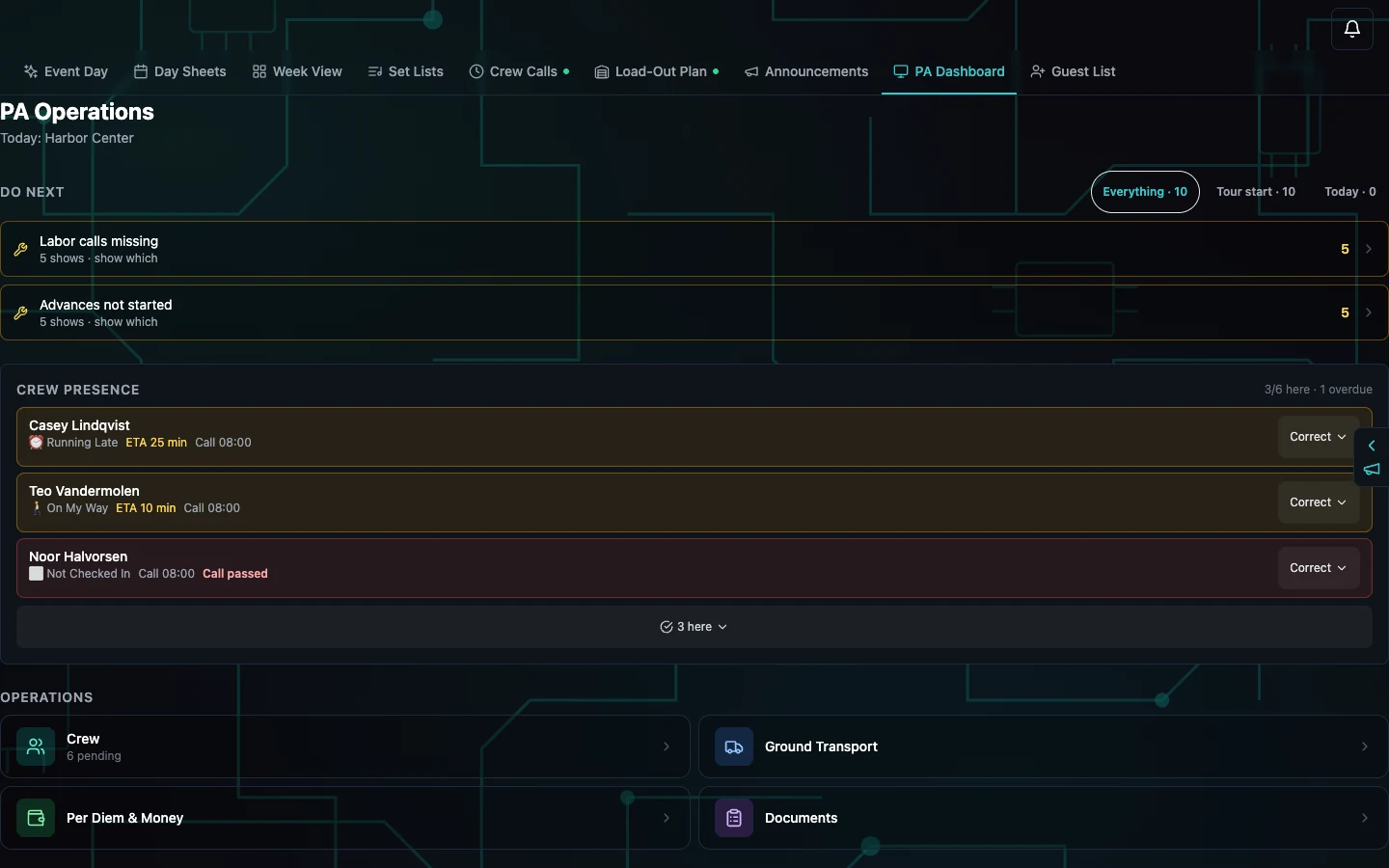
CuePack's PA Operations dashboard for today's Harbor Center show: a do-next queue, crew presence reporting three of six here and one overdue, an 08:00 call, one crew member running late with a 25-minute ETA, one on the way with a 10-minute ETA, one not checked in with call passed, and operating lanes for crew, transport, per diem and documents.

The PA board is exception-first. Three people are already collapsed into the here count; the surface keeps the late, on-the-way and overdue calls open with a correction action, while the do-next queue holds the unresolved advances and labour calls.

CuePack — Crew Day Interface
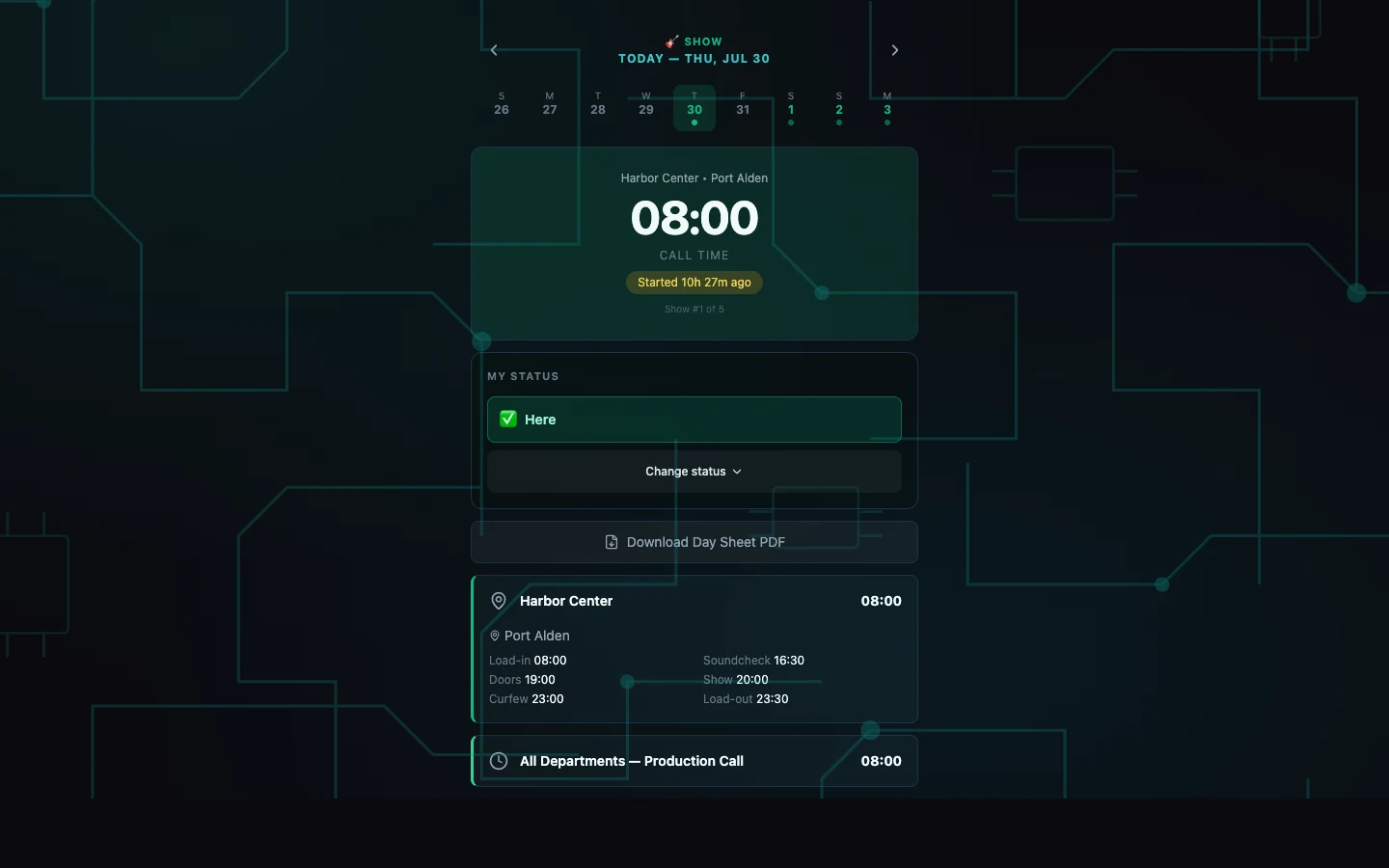
CuePack's crew-facing day interface with the current show date, Harbor Center in Port Alden, an 08:00 call, a Here status and Change status action, a day-sheet PDF action, load-in at 08:00, soundcheck at 16:30, doors at 19:00, show at 20:00, curfew at 23:00, load-out at 23:30 and an All Departments Production Call at 08:00.

Crew gets the facts and the one action it owns. Call time, venue, load-in, soundcheck, doors, show, curfew and load-out are visible together; the status control reports Here without exposing the production-management dashboard or another crew member's record.

Both field frames were exercised through CuePack's current role paths against one synthetic show-day fixture. No artist, customer, real venue, crew identity, email, host, network address or production service appears in the delivered pixels.

06

Availability

The commercial model is decided. The numbers are not.

In Development — Private Workflow Validation

How CuePack will be sold

Productions are seasonal, so CuePack is not sold as a flat per-seat subscription. The approved commercial architecture has four parts, and the exact amounts for each are still being set. No price is quoted until they are.

  • Account membership. The workspace, the gear and case library, and the operational history stay alive whether or not a production is currently out.
  • Active production packs. You pay for the productions that are actually running, not for a permanent seat count.
  • Scale add-ons. Larger truck-scale movements are priced above the standard production pack.
  • Standby and archive. A reduced state that keeps a dark production's history and templates available for the next leg.

Onboarding, implementation and support are quoted separately from the software. There is no public checkout, and CuePack is not billed automatically today.

Platform
Browser-based workspace. No installer required for the core planning workflow.
Account model
One production account with multiple collaborators; access is scoped by role.
Data
Schedules, venues, quotes, gear, cases, packs, calls, documents and history stay in the production workspace.
Release state
In development, validated privately against real production workflows. Public listing does not imply general availability.