
Contact

Production Tool

CueRoll

Capture a rehearsal note against the exact song and timecode it belongs to, keep it on your own machine, and hand a clean list to the department that has to fix it.

Private Validation · Coming Release

  • macOS & Windows desktop
  • LTC timecode from any audio input
  • Local JSON storage
  • Notion sync · LAN Live Link
CueRoll — rehearsal note desk
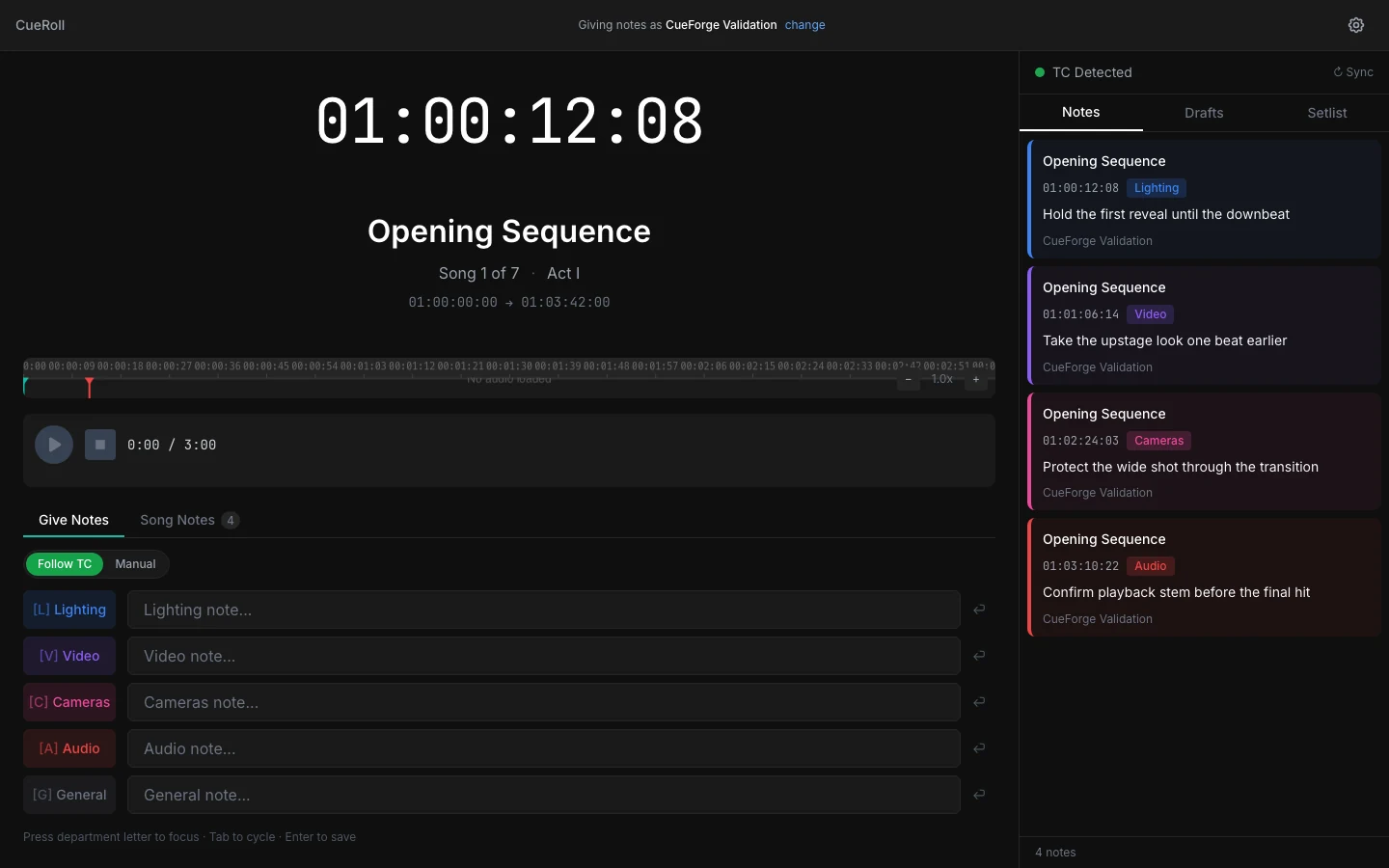
The CueRoll note desk: a large running timecode display over the current song and its timecode range, a timeline and transport underneath, department note fields along the bottom, and a notes column on the right holding four department-tagged notes.

Song 1 of 7, timecode running at 01:00:12:08. Current CueRoll runtime with a synthetic setlist, synthetic LTC input and generic department notes. No real show, artist, audio path or Notion workspace. Every detail on this page is a region of this same frame.

02

In the tech

The room is dark, both hands are busy, and the note still lands on the right beat

CueRoll assumes you have no spare hand to hunt for a timestamp. It reads the clock the show is already running, resolves it to the song everyone else is naming, and stamps the note for you.

Job — never guess the time again

Exact timecode, resolved to the exact song

A native decoder reads Linear Timecode from the audio interface, and the setlist turns that number into the song title, the act, and the range it sits inside. The number on screen is the number the department will search for tomorrow.

  • LTC decoded from any audio input, including virtual soundcards
  • Configurable timecode input channel for multichannel interfaces
  • Automatic song detection from the setlist's timecode ranges
  • Mismatch warning when incoming timecode drifts from the expected range

Boundary CueRoll does not generate timecode. It reads the show's existing clock and never drives consoles, media servers or playback.
Detail — clock and song
The CueRoll timecode display reading 01:00:12:08 above the song title Opening Sequence, marked song one of seven in act one, with its range of 01:00:00:00 to 01:03:42:00 and a timeline ruler beneath.

Interface detail from the accepted view — the running clock, the resolved song, its position in the set and the exact range it occupies.

Job — keep up with the room

One row per department, one key to reach it

Each department gets its own field, and each field has a single-key shortcut. Press the letter, type, press Enter — the song and timecode are attached at the moment of the note, not at the moment you got round to filing it.

  • Separate note rows for lighting, video, cameras, audio and general
  • Single-key focus per department and tab cycling between them
  • Enter submits; timecode is captured at the instant of the note
  • Follow-TC and manual modes for when the clock is not running
  • Per-song note view so a song can be reviewed as a unit

Boundary Live Link is a local-network tool for the room you are in, not a hosted collaboration service.

Detail — capture rows
The CueRoll capture area with Give Notes and Song Notes tabs, a Follow TC and Manual toggle, and five labelled note fields for lighting, video, cameras, audio and general, above a hint reading press department letter to focus, tab to cycle, enter to save.

Interface detail from the accepted view — five department rows, their single-key shortcuts, and the keyboard contract spelled out along the bottom edge.

03

The safe loop

Lock timecode, take the note, review before anything leaves

Notes are captured locally first and published deliberately. Nothing is pushed to a shared destination because you typed it fast in the dark.

  1. 01

    Chase timecode

    Decode LTC from the audio input the show is already feeding you, on the channel you select.

  2. 02

    Capture

    Hit the department key, type, and submit — the song and timecode are stamped for you.

  3. 03

    Collect from the room

    Crew on the local network add their own notes from a phone or laptop, attributed by name.

  4. 04

    Review

    Work the drafts, tidy the wording, and decide what is actually worth publishing to the department.

  5. 05

    Publish

    Send the approved set to the shared Notion database the production already uses.

Built for

  • Lighting programmers and designers working a tech or dress
  • Video engineers logging content and sync issues against the timeline
  • Production and stage managers running notes sessions
  • Music directors tracking timing and arrangement changes across rehearsals

Outside its authority

  • It does not generate timecode — it reads the show's existing clock
  • It does not control consoles, media servers or playback
  • Live Link is a local-network tool, not a hosted collaboration service
  • Programming cues from timecode is CueMaker's job, not CueRoll's

04

Interface detail bench

Where the note goes the moment you press Enter

Both benches below are regions of the same accepted runtime capture shown at the top of this page. Use Full frame on either one to see where the region sits in the window.

Three CueRoll notes in the review column, each headed Opening Sequence and stamped with its own timecode and a department tag for lighting, video and cameras, attributed to the same author.

A Every note carries its own clock

Interface detail from the accepted view. Song, timecode, department and author are attached to each note, so a list handed to a department is searchable without anyone reconstructing when it happened.
The top of the CueRoll review column showing a timecode-detected indicator with a sync control, above tabs for Notes, Drafts and Setlist.

B Drafts stay separate from published

Interface detail from the accepted view. Notes, Drafts and Setlist are distinct surfaces, and the timecode-detected indicator tells you whether the stamp on the next note can be trusted.

These are crops of one real runtime capture, not separate sessions. The setlist, the LTC source and the notes are synthetic.

05

Availability

Approved price, release still gated

Private Validation — Coming Release

CueRoll Individual

Approved CueRoll pricing
PlanPriceEntitlement
Individual $199/year One activation. Renewal extends the entitlement by one year.

This is the standard annual price for CueRoll. Cancellation expires the entitlement at the end of the term, and a failed payment gets a seven-day grace period before expiry. Older one-time and annual prices that once appeared on this site are obsolete.

Purchasing is not open yet. CueRoll is still in private validation, so activation runs through CueForge rather than a public checkout. Team licensing is being repriced and is not quoted.

Platform
Desktop application for macOS and Windows.
Signal input
LTC from an audio interface or virtual soundcard, on a selectable input channel.
Data boundary
Notes and setlists are JSON files in a folder you choose. Notion sync is opt-in and authorised per workspace.
Network
Live Link serves the local network only and is off until you start it.