
Contact

Production Tool

CueMaker

Build a beat-accurate grandMA3 timecode show from the tracks themselves — on a laptop, away from the console, and without trusting anything you have not reviewed.

Private Validation · Not Publicly Released

  • macOS desktop
  • Local audio analysis
  • MTC output
  • Version-aware grandMA3 export
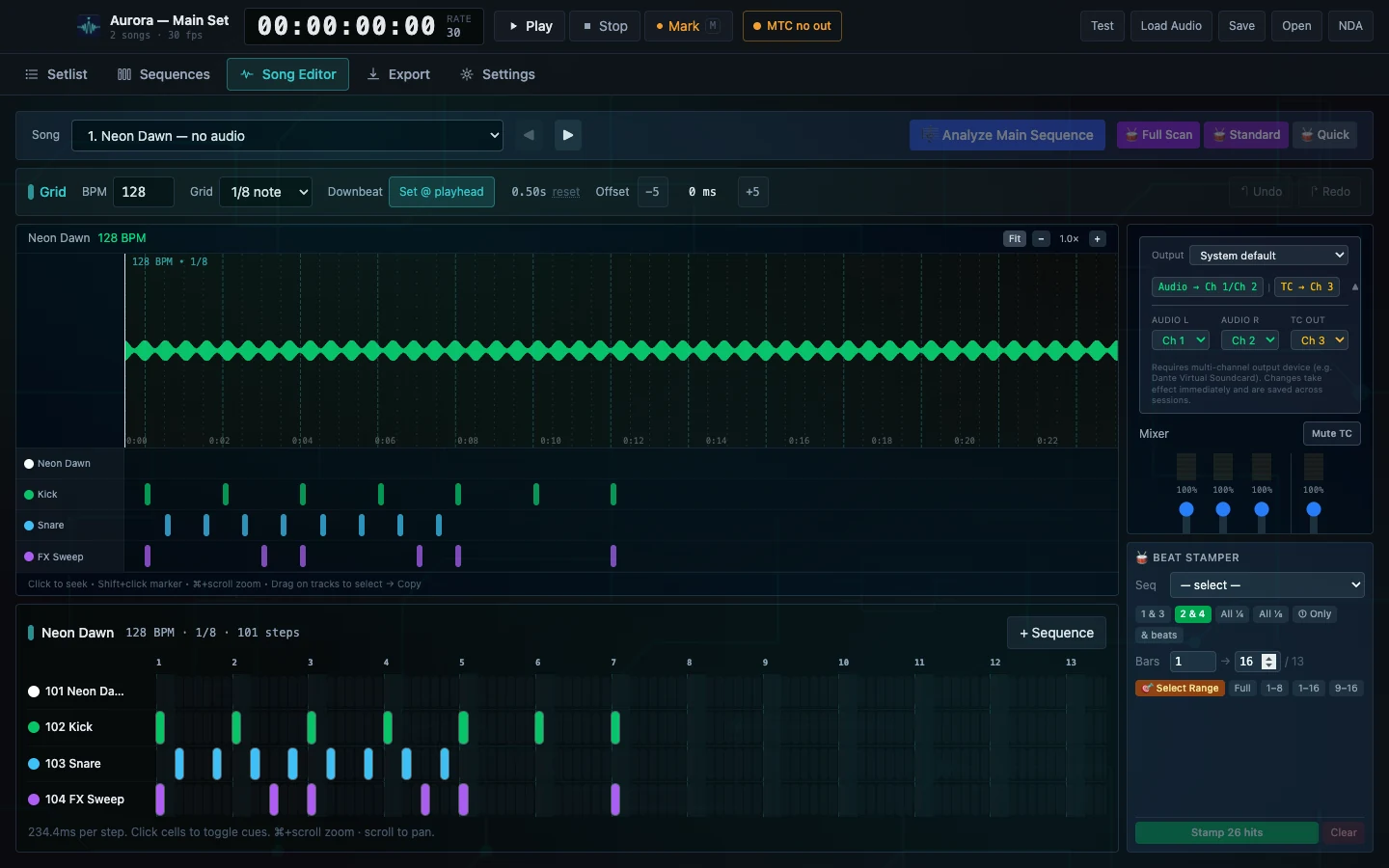
CueMaker — Song Editor
The CueMaker song editor: a timecode transport across the top, a track at 128 BPM on an eighth-note grid, a waveform with a beat grid beneath it, kick, snare and effect sweep lanes, a step sequence grid, and output routing and beat stamper panels on the right.

Song editor — a generic Aurora test track at 128 BPM. Accepted CueMaker verification capture. No customer, show or private filesystem identity is visible. This page shows three separate accepted captures of the current application.

02

Three moves through the application

Connect the audio, author on the beat, hand the console a bundle

Each scene below is its own accepted capture of the current CueMaker build, in the order a programmer actually meets them.

Move one — connect the sources

Roots that survive being unplugged

A real setlist lives across drives and folders, and half of them will be missing when you open the laptop on a bus. CueMaker keeps source roots as named connections with an explicit state, so an offline drive is visible rather than a silent failure.

  • Several connected source roots so a setlist can span drives and folders
  • Per-root file counts and last-scan times, with a manual rescan
  • Offline source states surfaced explicitly instead of failing silently
  • Frame rate and starting timecode configured once for the whole project

Boundary Analysis runs locally. Tracks are never uploaded to author a show.
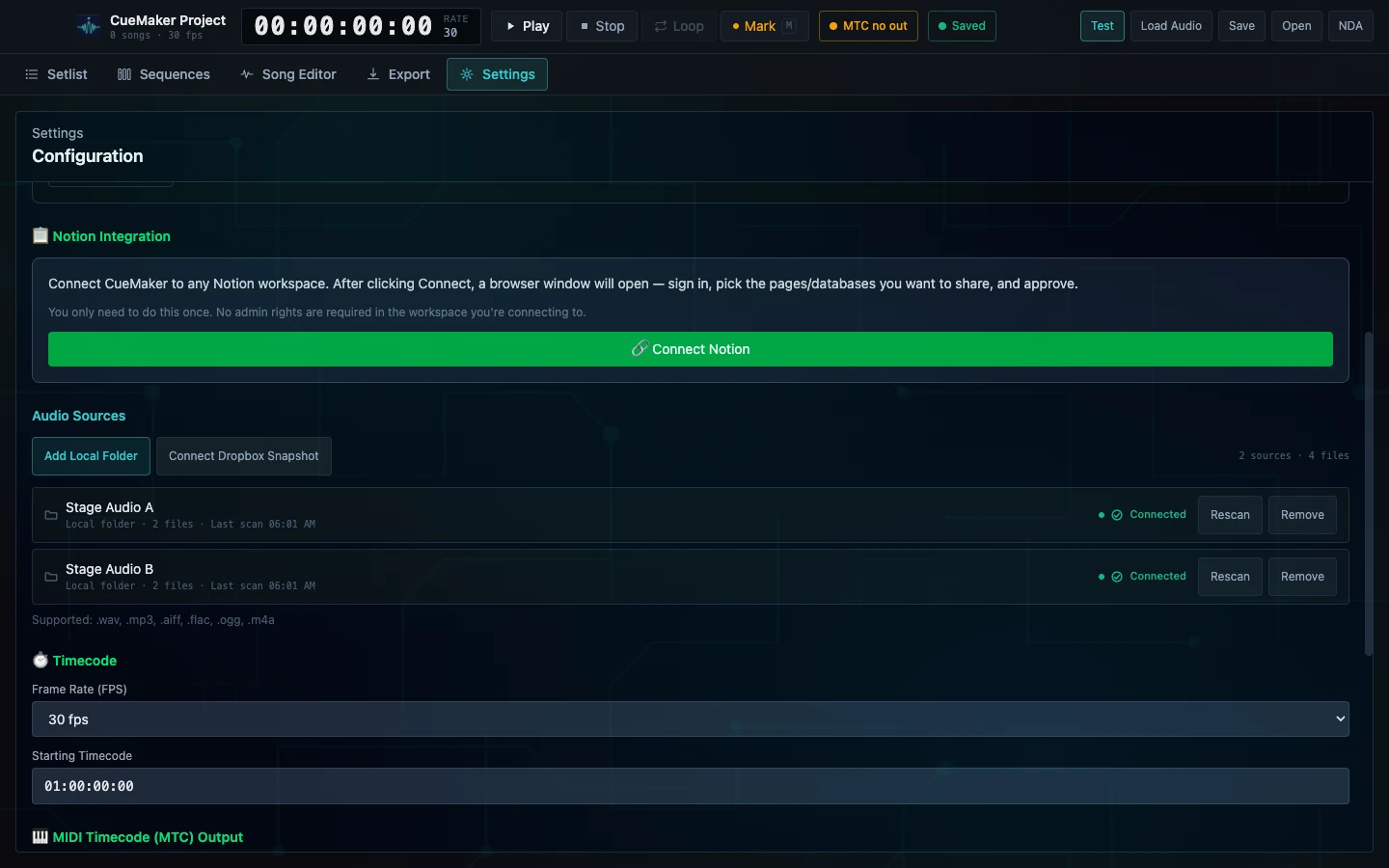
Accepted capture — Settings / Configuration
The CueMaker configuration screen showing a Notion integration block, two connected local audio source folders named Stage Audio A and Stage Audio B each reporting two files and a last scan time, a thirty frames per second timecode setting and a starting timecode of 01:00:00:00.

Two local folders connected as named roots, four files scanned, timecode set at 30 fps from 01:00:00:00. Generic source labels; no private path, customer or show identity.
Move two — author against the music

The grid comes from the track, not from a guess

Tempo and structure are analysed on your machine, and markers snap to that grid. Suggested structure and drum sequences arrive as proposals in the editor — you accept, edit or reject them before they become anything.

  • Beat-aligned marker placement against the waveform
  • Downbeat and offset controls in milliseconds for stubborn tracks
  • Separate lanes per element, with a step grid for repeated hits
  • Structure and drum-sequence suggestions offered for review, never auto-applied
  • Local transport with looping and seek for programming passes

Boundary CueMaker does not program looks. It produces timing, sequences and cue triggers.

Accepted capture — Song Editor
The CueMaker song editor with a 128 BPM eighth-note grid, a waveform overview, separate kick, snare and effect sweep lanes carrying markers, and a 101-step sequence grid below showing the same hits laid out by bar.

A generic Aurora test song on a 128 BPM eighth-note grid, with per-element lanes and a 101-step sequence view of the same material.

Move three — land it in the console

A bundle the console imports cleanly

Export targets a declared grandMA3 data version and reports what it is about to write before you commit: songs, sequences, cues and timecode pools, counted. Everything arrives as new objects, so nothing in the existing showfile is overwritten in place.

  • grandMA3 timecode XML carrying the authored marker events
  • Companion macro that creates the sequences the timecode expects
  • Explicit data-version selection with a structural validation pass
  • Export works offline — no network is required to produce show files
  • Import instructions issued alongside the export

Boundary CueMaker does not write into a live showfile. You import the export deliberately, and console-side cue-fire behaviour remains the programmer's responsibility to verify.

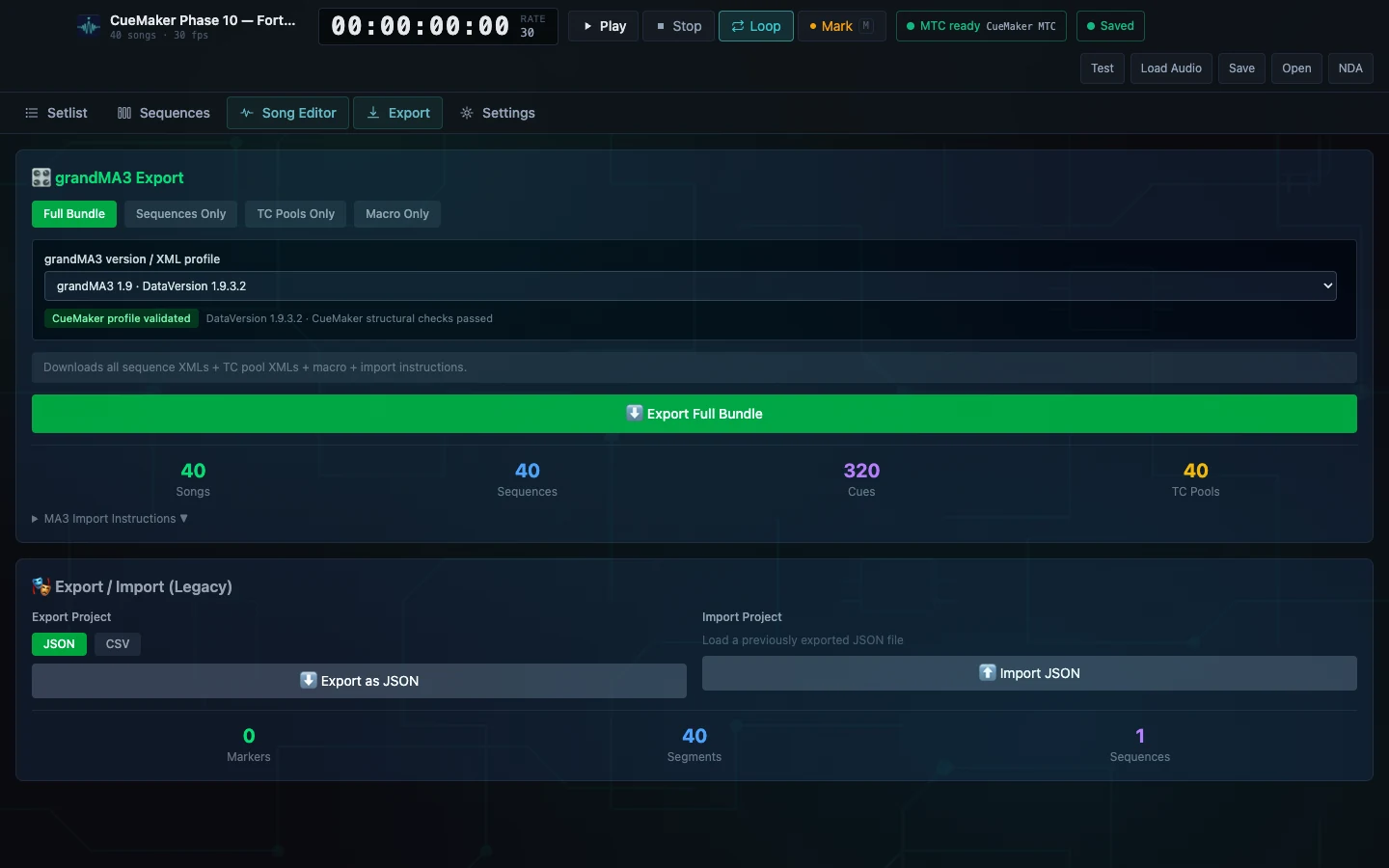
Accepted capture — Export
The CueMaker export screen with a full bundle selected for grandMA3 version 1.9, a validated CueMaker profile against the supported data revision, an export full bundle action, and counts reading forty songs, forty sequences, three hundred and twenty cues and forty timecode pools.

A 40-song project ready to emit 40 sequences, 320 cues and 40 timecode pools against a validated grandMA3 version 1.9 profile and supported data revision. Generic setlist; no private path, customer or show identity.

03

The safe loop

Analyse, author, review before apply

CueMaker never quietly rewrites your show. Analysis produces suggestions, suggestions are reviewed by a human, and only the accepted result becomes an export.

  1. 01

    Connect sources

    Point CueMaker at the folders holding the show's audio and keep them connected across sessions and restarts.

  2. 02

    Analyse locally

    Tracks are analysed on your machine for tempo and structure. Nothing is uploaded.

  3. 03

    Author

    Place and adjust markers against the waveform and the beat grid, lane by lane.

  4. 04

    Review

    Suggested structure and sequences are presented as proposals you accept, edit or reject.

  5. 05

    Export as new

    Emit grandMA3 timecode and macro files for import, versioned so nothing is overwritten in place.

Built for

  • Lighting programmers building timecode shows away from the console
  • Designers prepping structure before a rehearsal day starts
  • Programmers on tour working in a hotel, truck or plane
  • Music directors marking sections and hits for the whole production

Outside its authority

  • It does not program looks — it produces timing, sequences and cue triggers
  • It does not write into a live showfile; you import the export deliberately
  • Console-side cue-fire behaviour remains the programmer's responsibility to verify
  • Rehearsal note capture belongs to CueRoll

04

Interface detail bench

Two panels that do the repetitive work

Both benches below are regions of the accepted Song Editor capture. Use Full frame on either one to see where the panel sits in the editor.

The CueMaker beat stamper panel with a sequence selector, beat-subdivision choices including one and three, two and four, all quarter notes and all eighth notes, a bar range from one to sixteen out of thirteen, range presets, and a stamp twenty-six hits action.

A Beat stamper

Interface detail from the accepted view. Repeated hits are described, not clicked one at a time — pick the subdivision and the bar range, and the count of what will be stamped is shown before you commit.
The CueMaker output routing panel showing a system default output, audio assigned to channels one and two, timecode assigned to channel three, and a note that a multi-channel output device is required for this routing.

B Audio and timecode routing

Interface detail from the accepted view. Programme audio and timecode leave on separate declared channels, and the panel states the multi-channel device requirement instead of failing quietly at the rig.

These two are crops of the Song Editor capture. The three plates in chapter 02 are separate accepted captures of the current build.

05

Availability

Built, and deliberately unreleased

Private Validation — Not Publicly Released

No public download and no published price.

CueMaker has completed its local production programme, but customer distribution is a separate decision that has not been taken. There is no public installer, no self-service activation, and no store page.

The intended commercial shape is one price for one full-featured licence — no artificial tiers and no feature-gated editions. The amount has not been set, so no figure is quoted. Historic references to earlier amounts are not CueForge's commercial position.

Platform
macOS desktop application.
Data boundary
Audio analysis and project storage stay on the local machine. Export runs offline.
Interchange
grandMA3 timecode XML and macro XML for import; MIDI Timecode output for live drive.
Remaining gates
Physical grandMA3 import and cue-fire certification, and a customer distribution decision, are still open.