
Contact

Production Tool

CueScale

The tempo changed. Rescale the grandMA3 timecode pool to the new BPM and import it as a new pool — instead of rebuilding a song from scratch at midnight.

Private Validation · In Development

  • macOS & Windows desktop
  • grandMA3 timecode pool XML
  • Files processed locally
  • Exports a new pool, never overwrites
CueScale — export-ready review
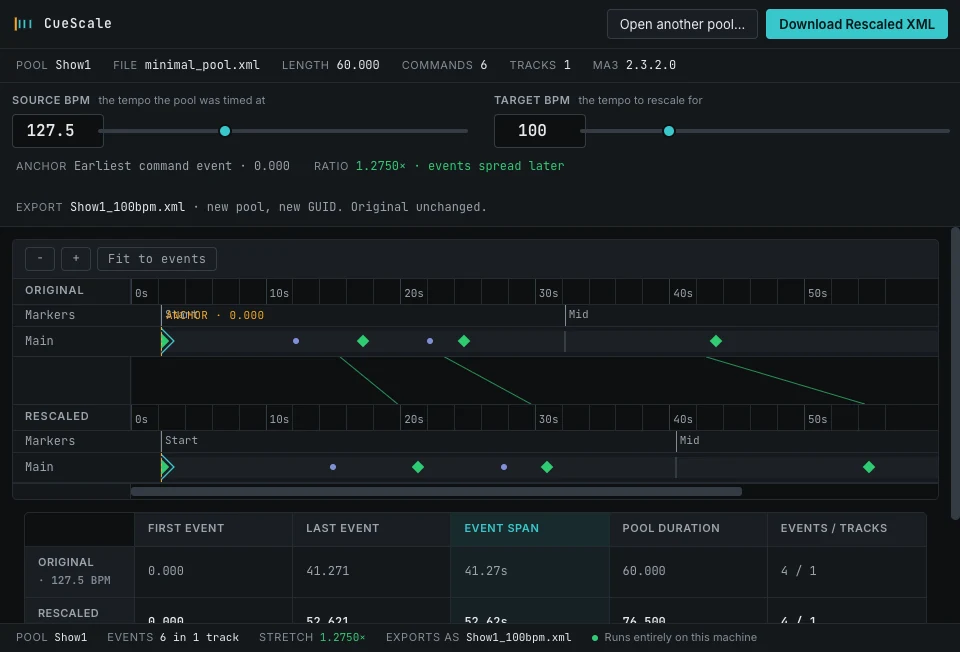
The CueScale window: a loaded pool summary across the top, source and target BPM controls set to 127.5 and 100, an anchor and ratio readout, the export filename, original and rescaled timelines stacked for comparison, and a table of first event, last event, event span and pool duration.

127.5 BPM rescaled to 100 BPM at a ratio of 1.2750×. Accepted CueScale visual-QA capture using synthetic grandMA3 XML fixtures. The original pool remains untouched while the reviewed result is prepared as a new export. Every detail on this page is a region of this same frame.

02

The transform

Two numbers in, one reviewable result out

CueScale is deliberately small. You supply the tempo the pool was timed at and the tempo the show has moved to; everything else is arithmetic it shows you before it writes anything.

Job — make the maths inspectable

Anchored rescaling, stated on screen

The anchor is the earliest command event in the pool. Events before it pass through unchanged; later events scale by the ratio of source tempo to target tempo. The ratio, the anchor and the resulting filename are all printed before you export.

  • The anchor is the earliest command event in the pool
  • Events before the anchor pass through unchanged
  • Later events scale by the ratio of source tempo to target tempo
  • Rescaling to the same tempo is required to leave the file byte-identical

Boundary CueScale does not analyse audio or detect tempo. You supply both numbers.
Detail — tempo controls
The CueScale header showing the loaded pool, its filename, length, command count and grandMA3 version, above a source BPM of 127.5, a target BPM of 100, an anchor at the earliest command event, a ratio of 1.2750 times with events spread later, and the export filename.

Interface detail from the accepted view — source tempo, target tempo, the anchor rule, the computed ratio and the export name, all visible before anything is written.

Job — see it before you commit

Original and rescaled, stacked

The projected result is drawn against the original in a familiar MA3-style layout, with each event connected to where it will land. You are reading a comparison, not trusting a number.

  • Original and rescaled timelines displayed together on a shared time ruler
  • Markers and command events drawn in both rows with their connections
  • Preview is display data — the export file is generated at export time
  • Keyboard export shortcut for a repeated pass across several songs

Boundary CueScale does not connect to a console or write into a live showfile.

Detail — timeline comparison
The CueScale comparison view with an original timeline row of markers and command events above a rescaled timeline row, diagonal connectors showing each event moving later, and a shared time ruler running from zero to fifty seconds.

Interface detail from the accepted view — the original row, the rescaled row, and a connector for every event that moves.

03

The safe loop

Load, set the tempos, compare, export as a new pool

One transformation, shown before it is applied, written as a new object so the original pool is untouched.

  1. 01

    Load

    Drop a grandMA3 timecode pool export onto the window, or open it from disk.

  2. 02

    Set tempos

    Enter the source BPM the pool was timed at and the target BPM the show has moved to.

  3. 03

    Compare

    Review original and projected timelines side by side, with the event span and pool duration recomputed.

  4. 04

    Export as new

    Write a new pool with its own identifier and a tempo-suffixed name, leaving the original alone.

Built for

  • Lighting programmers whose track tempo moved between rehearsals
  • Designers reusing a programmed song at a different tempo
  • Programmers carrying a timecoded show between versions of an arrangement

Outside its authority

  • It is a focused utility, not a show-programming platform
  • It does not analyse audio or detect tempo — you supply both numbers
  • It does not connect to a console or write into a live showfile
  • Authoring a timecode show from tracks is CueMaker's job

04

Interface detail bench

The two lines that make it safe to run at midnight

Both benches below are regions of the same accepted capture shown at the top of this page. Use Full frame on either one to see where the region sits in the window.

The CueScale comparison table listing original and rescaled rows against first event, last event, event span and pool duration columns, with a status bar underneath reporting the pool, event count, stretch ratio, export filename and a note that it runs entirely on this machine.

A The numbers that change

Interface detail from the accepted view. First event, last event, event span and pool duration are reported for both versions, and the status bar restates the stretch ratio, the output filename and that processing is local.
The CueScale anchor and ratio line reading anchor at earliest command event, ratio 1.2750 times with events spread later, above an export line naming the output file and stating new pool, new GUID, original unchanged.

B New pool, new GUID, original unchanged

Interface detail from the accepted view. The export contract is written on the screen you are looking at — a new identifier and a tempo-suffixed name, so grandMA3 imports an addition rather than a replacement.

These are crops of one accepted visual-QA capture, not separate sessions. The pool and its events are synthetic grandMA3 XML fixtures.

05

Availability

In development, no published price

Private Validation — In Development

CueScale is not on public sale.

CueScale is a deliberately small utility in private validation. How it will be distributed — and what it will cost — has not been decided, so no amount is quoted here. Local builds and packaging evidence are not a customer release.

If a tempo change has cost you a rebuild, the useful next step is to tell us the workflow you would want covered.

Platform
Desktop application for macOS and Windows.
Input
grandMA3 timecode pool XML exported from the console.
Output
A new importable timecode pool with its own identifier and tempo-suffixed name.
Data boundary
Show files are processed on the machine and are never uploaded by CueScale.
Release state
In development. Signing, notarisation and customer distribution remain external release gates.