

Contact

Production Tool

CueNotch

Turn Notch block files into reviewable DMX and FX documentation and console-ready fixture and profile outputs for the crew handoff.

Private Validation — Not Publicly Released

  • Desktop application
  • Notch block files in
  • Operator documentation out
  • MA fixture & profile outputs
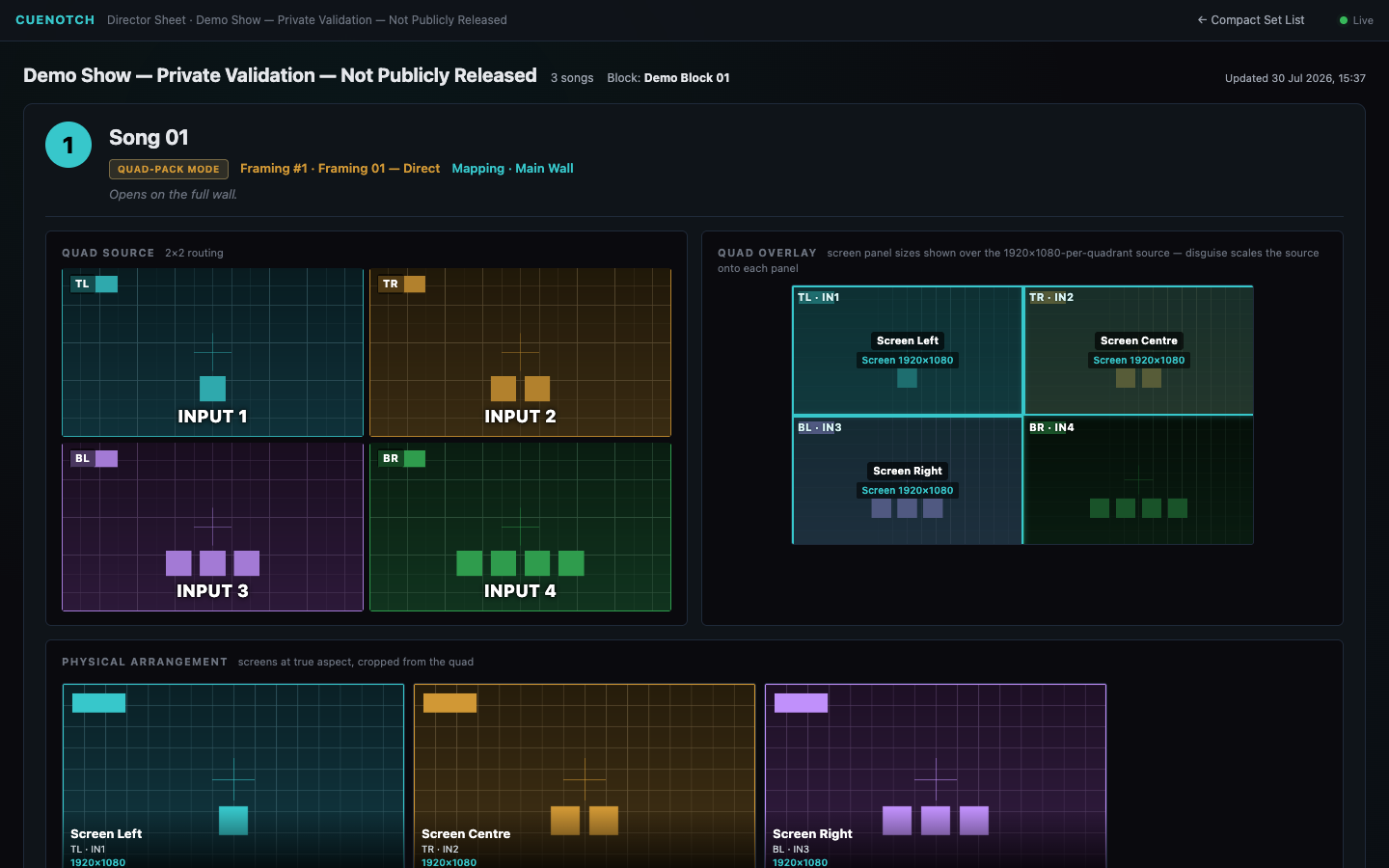
CueNotch — Director Sheet / Shared Routing Brief
The CueNotch director sheet for song one of a synthetic three-song validation show, headed Private Validation and Not Publicly Released: a quad-pack mode tag with the song's framing and mapping named beside it, a quad source card drawing the two-by-two routing as inputs one to four in four colours, a quad overlay card showing the 1920 by 1080 screen panels laid over each quadrant of that source, and a physical arrangement row redrawing screen left, screen centre and screen right at true aspect with their input and resolution labels.

Director Sheet — the shared routing brief for the director and vision team. One song, four inputs and three physical screens are written down instead of remembered. The exact audited CueNotch runtime generated this sheet from a synthetic block file on a localhost-only session. The page header carries its own boundary: Private Validation — Not Publicly Released. No customer, artist, venue, network or audit identity is involved, and a live local document server is not public availability.

02

The handoff problem

One person knows what channel 63 does. Everyone else is guessing.

The person who built the Notch content knows what each exposed parameter means on each layer. Until CueNotch, the only way anyone else found out was retyping it into a spreadsheet — and the desk operator and the video director needed different halves of it. Underneath every one of those sheets is the same thing: a channel map that had to be read out of the block first.

Job — give the desk operator the channels

Every FX slot named, layer by layer

The operator sheet lists the per-song FX parameters the way the desk needs them: slot, DMX channel, console channel, range, default and what the slot actually does. These are the parameters that change song to song, and the sheet says so at the top rather than leaving the operator to find out during the set.

  • FX slots resolved to both their DMX channel and the console channel
  • Range and default printed beside every parameter
  • Layer filter, because the same slot number means different things per layer
  • Per-parameter flagging, so a wrong entry is marked where it was found

Boundary CueNotch documents and generates. It does not drive DMX or control a show.
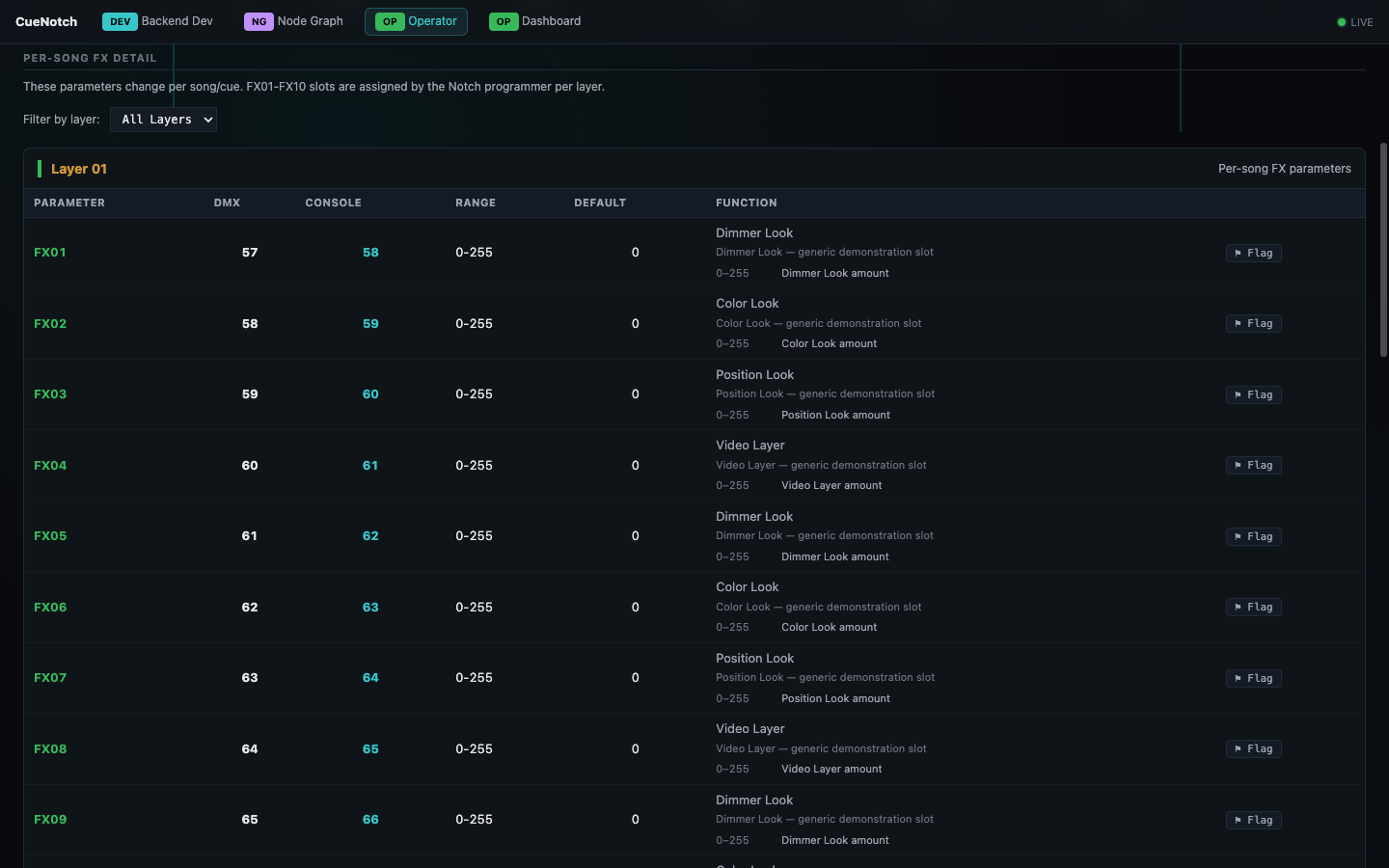
CueNotch — Operator Sheet / Desk Reference
The CueNotch operator sheet showing per-song FX detail for layer one: a note that these parameters change per song and that the FX slots are assigned by the Notch programmer per layer, a layer filter, and a table of FX slots one to nine giving each slot's DMX channel, console channel, zero to 255 range, default of zero and its function such as dimmer look, colour look, position look or video layer, each row carrying a flag control.

Operator Sheet — the desk reference. Generated from the block, with slot, DMX channel, console channel, range, default and function on one line — the table that otherwise gets retyped by hand before every show. The parameters shown are synthetic slots from the validation block.
Job — put every reader on the same block

One block in, a document for each person who needs one

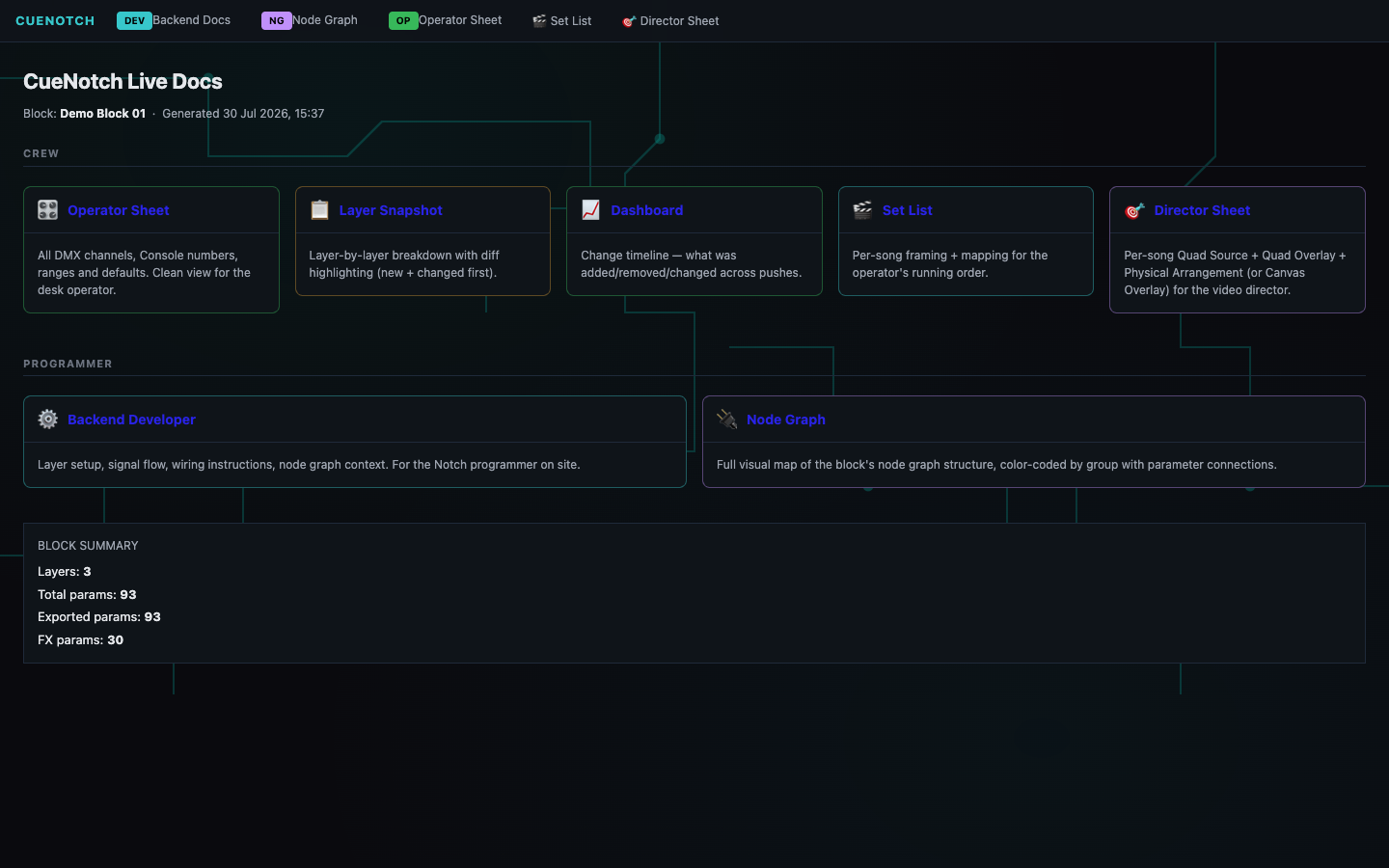
The director sheet above and the operator sheet beside it are two outputs of a single extraction, and the hub is where that set is published. The crew documents and the programmer documents are generated together from the same block, so nobody is reading a version that stopped being true two exports ago.

  • Crew documents — operator sheet, layer snapshot, change dashboard, set list and director sheet
  • Programmer documents — layer setup and wiring notes, and the block's node graph
  • Block summary reporting layers, total parameters, exported parameters and FX parameters
  • Generated timestamp printed on the hub, so a stale document is visible as stale

Boundary Block-file compatibility is still being validated. Universal compatibility is not claimed, and the local documentation view has no access control.

CueNotch — Live Docs / Role-Sheet Index
The CueNotch Live Docs hub, headed with the block name and the time the documentation was generated: a crew row of cards for the operator sheet, layer snapshot, dashboard, set list and director sheet, each describing what that document is for, a programmer row of cards for backend developer notes and the node graph, and a block summary reporting three layers, ninety-three total parameters, ninety-three exported and thirty FX parameters.

Live Docs — the role-sheet index. Three layers, 93 parameters, 93 exported, 30 of them FX — counted from the block rather than asserted. The generated timestamp is on the page, because the failure this replaces is a crew working from a document that is quietly out of date.

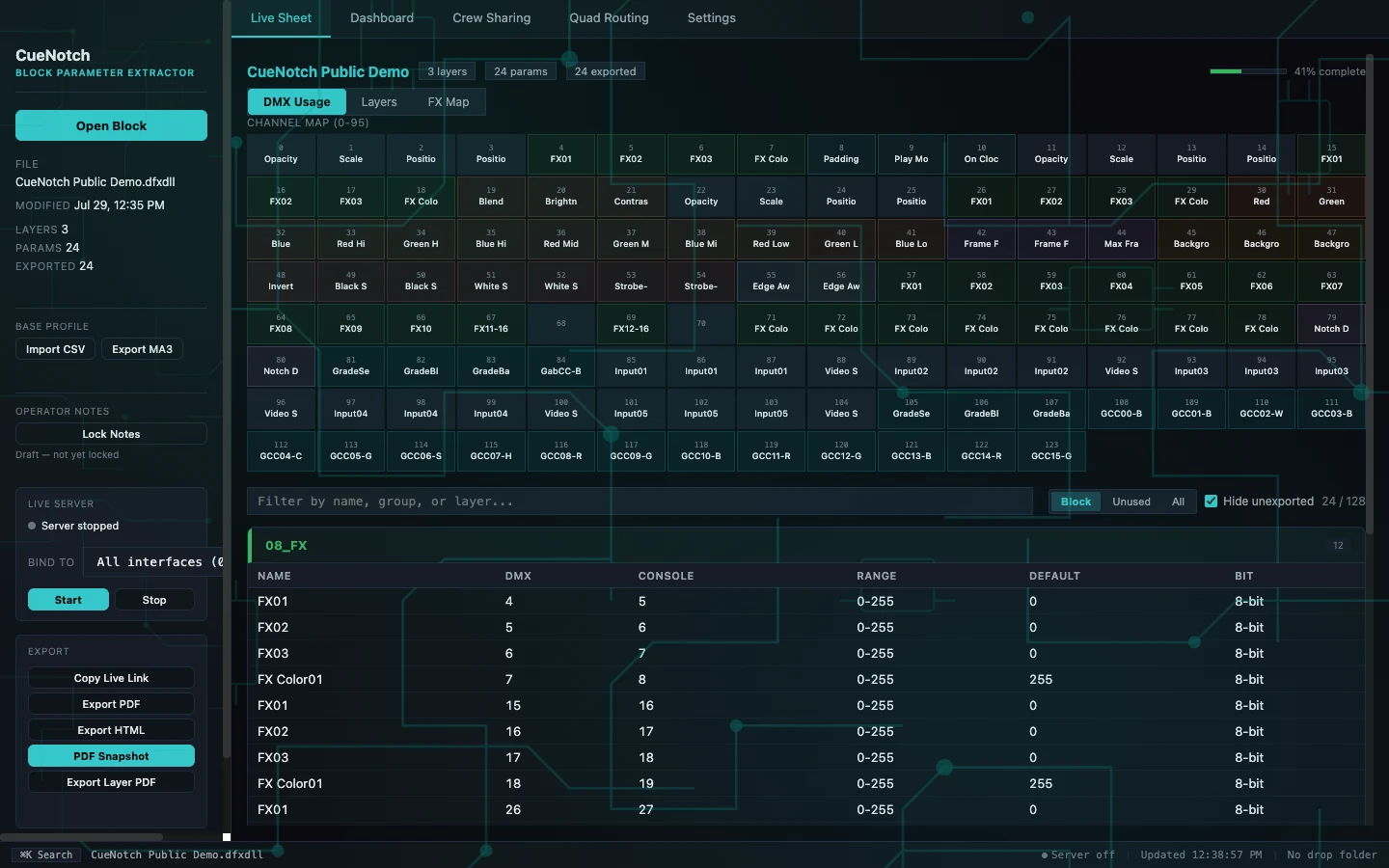
CueNotch — Live Sheet DMX Map / Programmer Source Map
The CueNotch Live Sheet for a synthetic validation block reporting three layers, twenty-four parameters and twenty-four exported: a DMX usage channel map covering channels zero to ninety-five as a grid of named tiles for opacity, scale, position, FX slots, colour, blend, brightness, contrast, frame, background, invert, strobe and input parameters, a filter row with block, unused and all views and a hide-unexported toggle reading twenty-four of one hundred and twenty-eight, and a parameter table listing each name against its DMX channel, console channel, zero to 255 range, default and eight-bit depth, beside a left rail showing the block file, its layer and parameter counts, a stopped live server with start and stop controls, and export controls for CSV, MA3, PDF, HTML and layer PDF.

Live Sheet DMX Map — the programmer source map behind the role-specific sheets. Unexported channels are held back rather than padded out. Twenty-four of 128 channels are in use in this synthetic block, and the sheet says so instead of presenting a full universe. Every row carries its DMX channel, console channel, range, default and bit depth, and the export row is where the MA fixture and profile outputs come from. The live server is stopped in this capture — nothing was being served to any network. Private Validation — Not Publicly Released.

All four images on this page are separate captures of the exact audited CueNotch runtime on a localhost-only machine. The director sheet, operator sheet and documentation hub are one session reading a synthetic three-layer validation block of 93 parameters; the Live Sheet above is a separate session reading a smaller synthetic 24-parameter block, which is why its counts differ. The documentation server served that machine and nothing else, and is shown stopped in the Live Sheet; the local documentation view has no access control and is not intended for untrusted networks. A local document server running is not public availability — CueNotch remains in private validation and is not publicly released.

03

The safe loop

Load the block, read the personality, hand the crew a document

Nothing is published to the room until a human has reviewed what the extraction produced.

  1. 01

    Load

    Open a Notch block file and extract its layers and exposed parameters.

  2. 02

    Map

    Resolve each parameter to its DMX channel, reading the file first and falling back to the personality template.

  3. 03

    Review

    Check the per-layer differences, annotate parameters, and compare against the previous version.

  4. 04

    Generate

    Produce the operator documentation and the fixture and profile outputs for the console.

  5. 05

    Hand off

    Share the generated document with the crew who have to run the show.

Built for

  • Notch programmers who currently maintain the personality sheet by hand
  • Media-server operators who need to know what each channel does
  • Lighting programmers importing the fixture into the console
  • Production crews who need one current reference rather than four stale ones

Stated limits

  • Block-file compatibility is still being validated; universal compatibility is not claimed
  • The local documentation view has no access control and is not intended for untrusted networks
  • It is not certified for unattended show operation
  • There is no public download and no signed customer distribution
  • It documents and generates; it does not drive DMX or control a show

04

Status

Portfolio recognition, not a release

Private Validation — Not Publicly Released

CueNotch appears here because the work is real, not because it is for sale.

CueNotch is undergoing private compatibility and buyer validation. There is no public download, no purchase path, and no published price. Nothing on this page should be read as a release date or an availability commitment.

If you run Notch content on a show and maintain the personality reference by hand, that is exactly the workflow being validated — and it is worth a conversation.

Platform
Desktop application, with a command-line path over the same engine.
Input
Notch block files. Compatibility beyond the blocks tested so far is unproven.
Output
Operator documentation, DMX and personality references, MA fixture and profile outputs, CSV, JSON, HTML and PDF.
Release state
Private validation. Distribution, signing, licensing and support terms are undecided.