Contact

Production Tool

CueSwitcher

Plan the cut before the show — cameras, shot sheet, setlist and timeline — then follow it with real countdowns instead of a paper running order and a memory.

In Development · Private Validation

  • macOS & Windows desktop
  • Timecode chase from LTC or MTC
  • Camera plot · shot sheet · timeline
  • Supported switcher adapters
CueSwitcher — Show Timeline
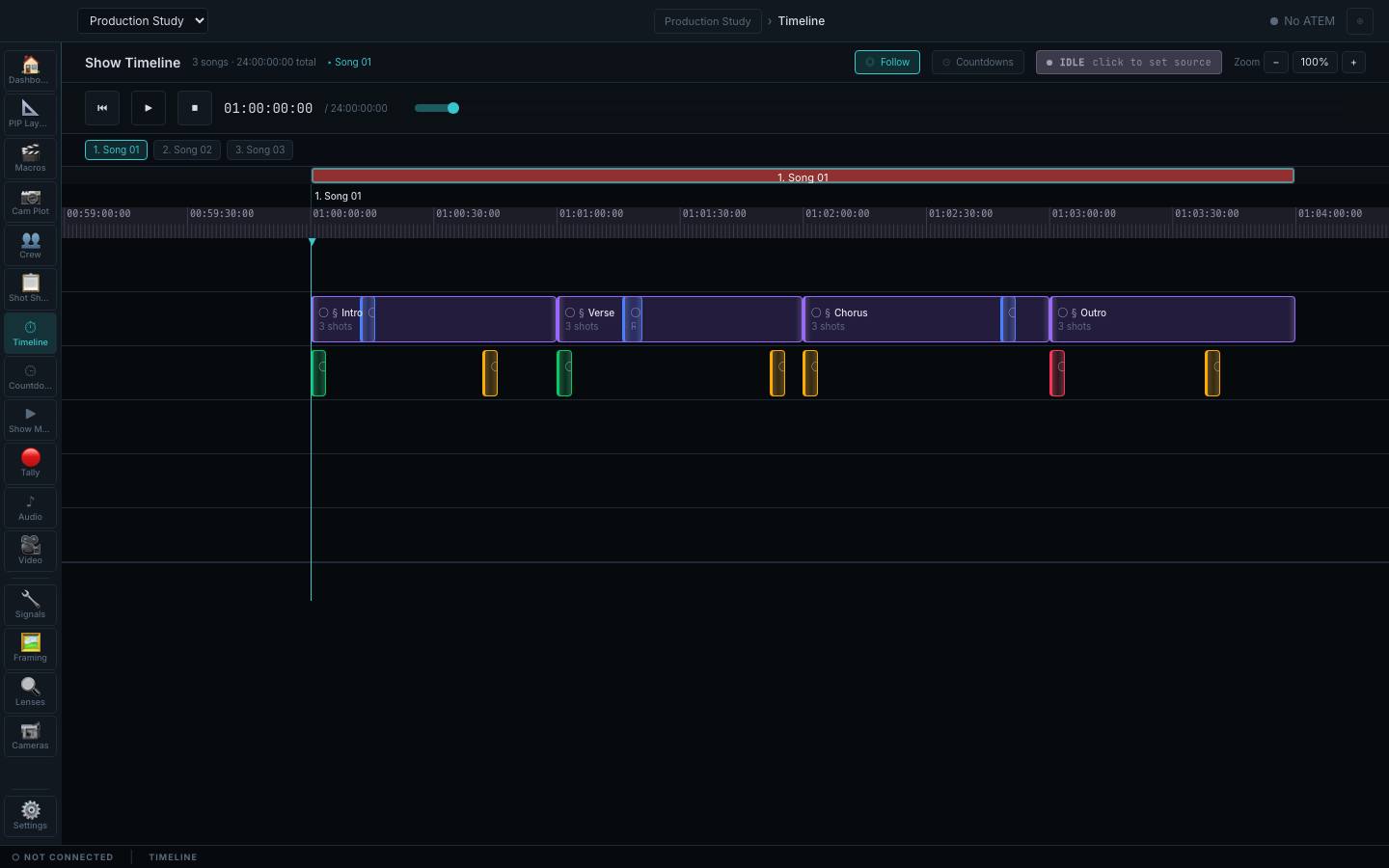
The CueSwitcher Show Timeline for a three-song show: a transport parked at one hour with a follow toggle, countdown toggle and an idle source control, song tabs for songs one to three, a red song band spanning the ruler, section blocks for intro, verse, chorus and outro each marked three shots, a row of recorded cue markers along the song, a left tool rail, a no-ATEM chip and a status bar reading not connected.

One whole song reviewed end to end — intro, verse, chorus and outro, three shots each, with every recorded cue on the ruler. The current CueSwitcher runtime against a synthetic three-song show. The transport is parked and idle with no timecode source set, and the corner chip and status bar both report the switcher disconnected — this is the review surface, not proof of live hardware control.

02

Answering it in the room

The reference the video department otherwise carries in its head

The same application that holds the plan also answers the questions that stop a load-in: what cable survives this run, and what lens covers that shot from where the camera is actually standing.

Job — get the run right the first time

Cable formats, distances and what they need at the far end

A signal path reference for broadcast video infrastructure, held next to the show rather than in a bookmark. Ask what will carry a run of a given length, and read the formats against their standard, bandwidth, maximum distance, connector and the situation each one is actually for.

  • Quick lookup by run distance in metres or feet
  • SD, HD, 3G, 6G and 12G SDI with their standards, bandwidths and distance limits
  • HDMI 1.4, 2.0 and 2.1 with the short runs they are honestly good for
  • Fibre, LC duplex, ST 2110 and NDI with their converter and network requirements

Boundary This is reference data shipped with the application. It does not measure, test or certify an installed cable run.
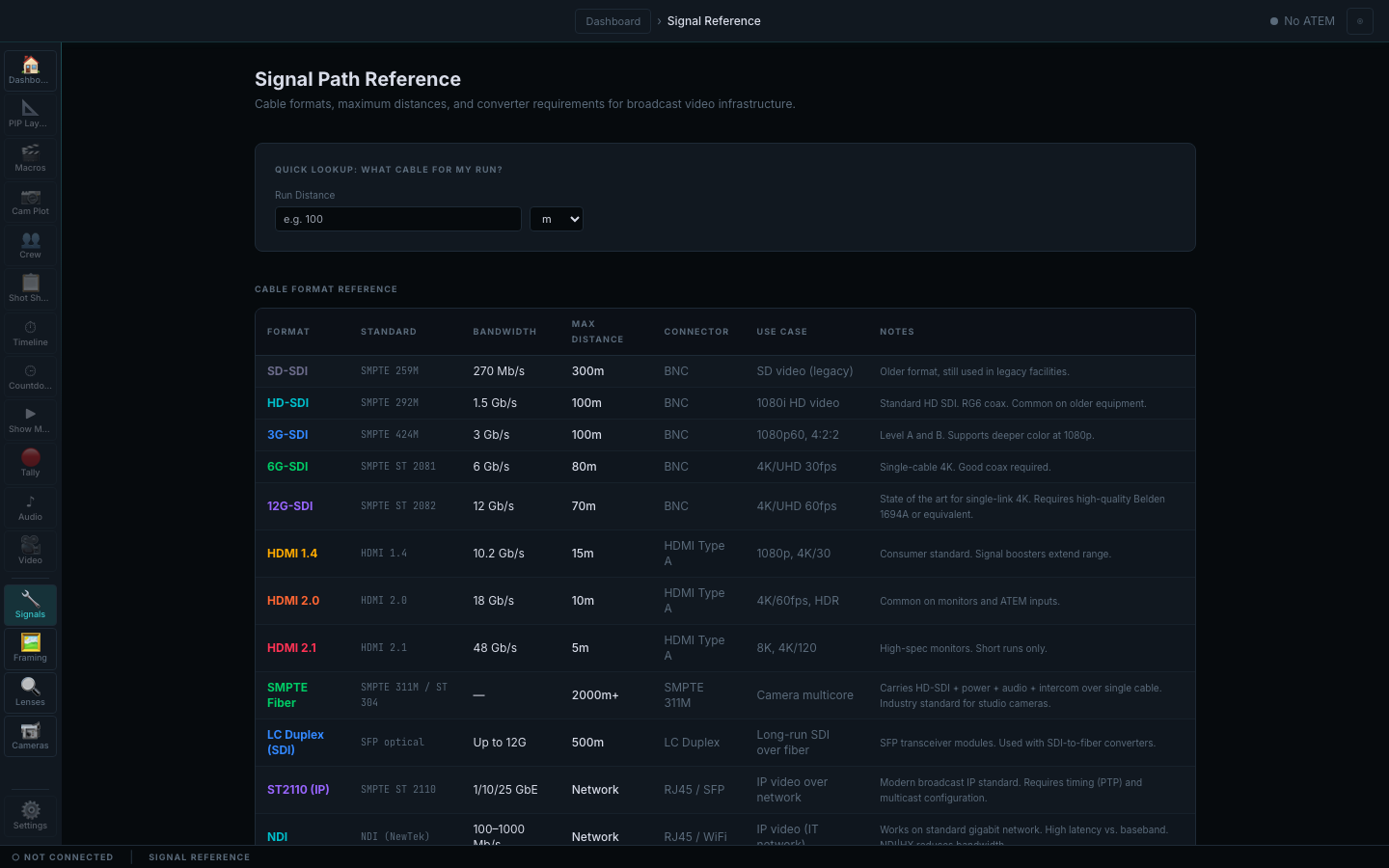
CueSwitcher — Signal Path Reference
The CueSwitcher Signal Path Reference: a quick-lookup field asking for a run distance in metres, and a cable format table listing SD-SDI, HD-SDI, 3G-SDI, 6G-SDI, 12G-SDI, HDMI 1.4, 2.0 and 2.1, SMPTE fibre, LC duplex, ST 2110 and NDI with their standard, bandwidth, maximum distance, connector, use case and notes, above a status bar reading not connected.

Reference, not measurement. Every row states its own limit — 12G-SDI at 70 m on high-grade coax, HDMI 2.1 honest about five metres, fibre where the distance genuinely needs it.
Job — know the shot is reachable

Field of view worked out before the camera is placed

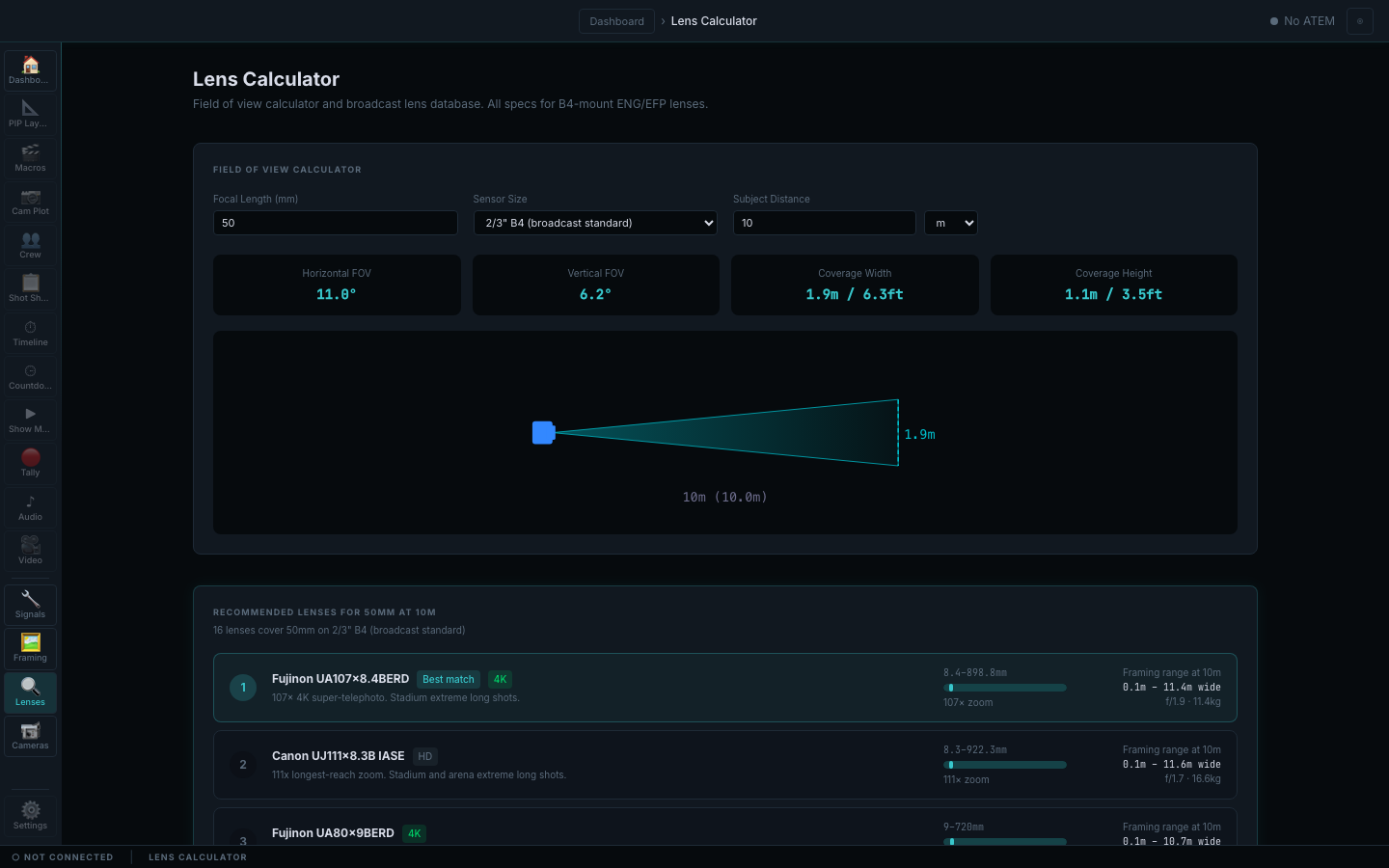
Give it a focal length, a sensor and a subject distance, and it returns the horizontal and vertical field of view and the width and height that will actually be covered — then lists the lenses that reach that framing, with their zoom range, aperture and weight.

  • Coverage width and height returned in both metres and feet
  • Sensor selection including 2/3-inch B4 broadcast
  • Scale diagram of the calculated cone at the entered distance
  • Ranked lens matches with framing range, zoom factor, aperture and weight

Boundary Switcher support is limited to the adapters listed below; other systems are not claimed, and camera-control adapters for further manufacturers are not available.

CueSwitcher — Lens Calculator
The CueSwitcher Lens Calculator: focal length, sensor size and subject distance inputs set to fifty millimetres on a two-thirds-inch broadcast sensor at ten metres, result tiles giving an eleven degree horizontal and six point two degree vertical field of view with coverage of one point nine metres wide by one point one metres high, a scale diagram of the lens cone, and a ranked list of recommended broadcast zoom lenses with their focal ranges, framing range at ten metres, aperture and weight.

The maths done where the plan lives. 50 mm on a 2/3-inch B4 at 10 m covers 1.9 m — a shade under two people. The lens list is shipped reference data, ranked against the framing that was asked for.

03

The safe loop

Plan the show, rehearse the cut, follow it live

The shot sheet is the source of truth. The timeline projects it onto real time, and the show-mode view follows that timeline — hand-authored work is never overwritten by a projection.

  1. 01

    Plot the cameras

    Place the camera positions the show actually has, and name them the way the crew does.

  2. 02

    Build the shot sheet

    Work song by song and section by section, assigning framings per camera with per-cell overrides.

  3. 03

    Anchor to time

    Attach audio, capture the printed timecode offline, and let sections land at real positions.

  4. 04

    Rehearse

    Scrub the timeline, run the transport, and check the cut against the music before doors.

  5. 05

    Run show mode

    Chase timecode and give every operator a countdown to their next shot.

Built for

  • Directors planning and rehearsing a cut for a music or corporate show
  • Camera operators who need a countdown to their next framing
  • Technical directors preparing macros and layouts before doors
  • Video departments that want the plan and the run in one document

Outside its authority

  • Switcher support is limited to the adapters listed above; other systems are not claimed
  • Camera-control adapters for further manufacturers are not available
  • It does not replace the physical switcher, the TD, or the director's judgement
  • Desktop builds are unsigned and are not a customer distribution

04

Shot language to camera placement

A called shot becomes a camera in a room

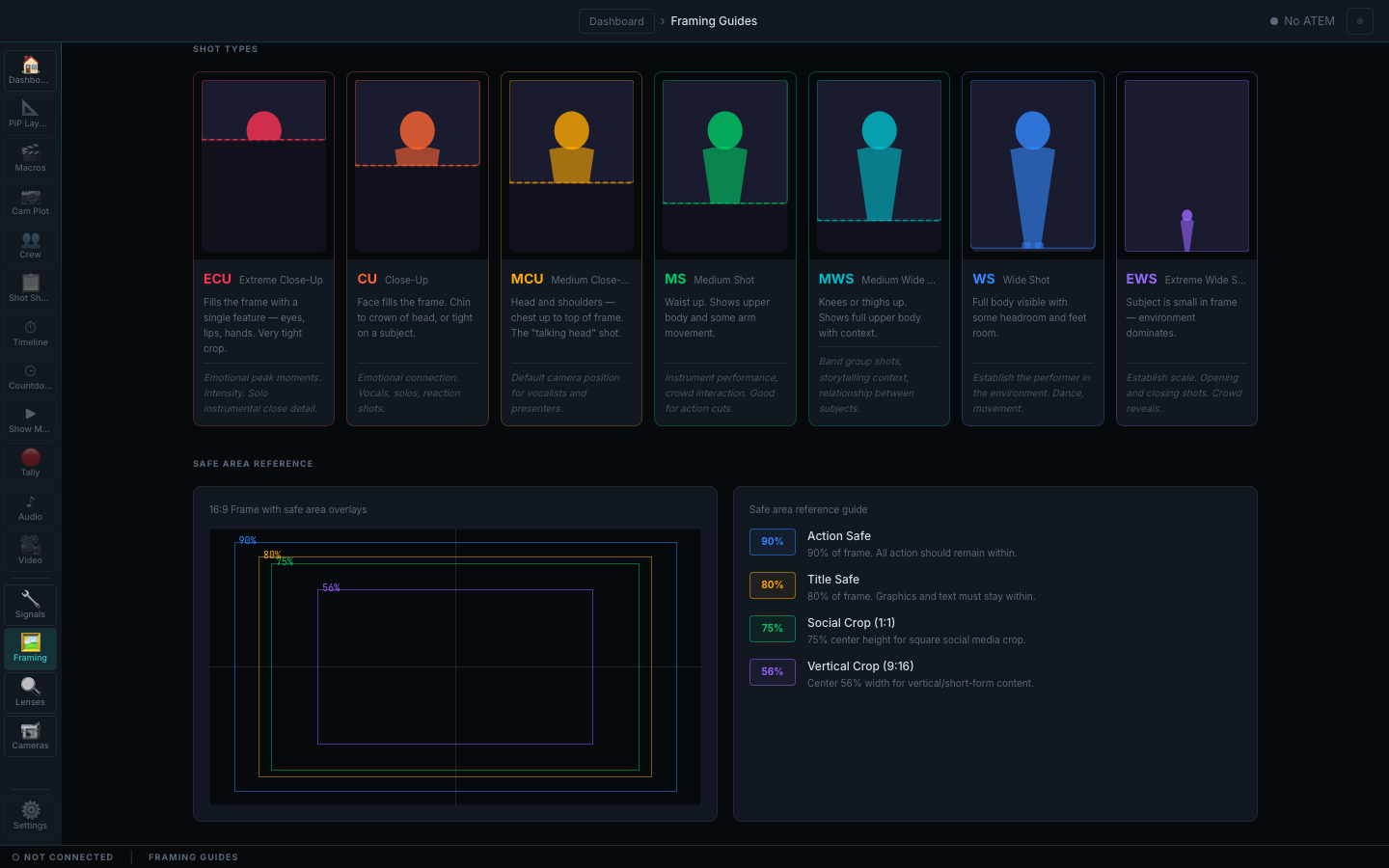
Shot Types gives the crew one framing vocabulary. Camera Plot turns that vocabulary into placed cameras, operators, lenses, stage geometry and a preflight-ready plan.

CueSwitcher — Shot Types / Shared Vocabulary
CueSwitcher's Shot Types reference with seven illustrated cards for extreme close-up, close-up, medium close-up, medium shot, medium wide shot, wide shot and extreme wide shot, each explaining where the subject is cropped and when the framing is used.

Seven shot sizes, each drawn and explained. MCU, MS and EWS stop being labels each operator interprets differently; the cards state the crop and the production use.

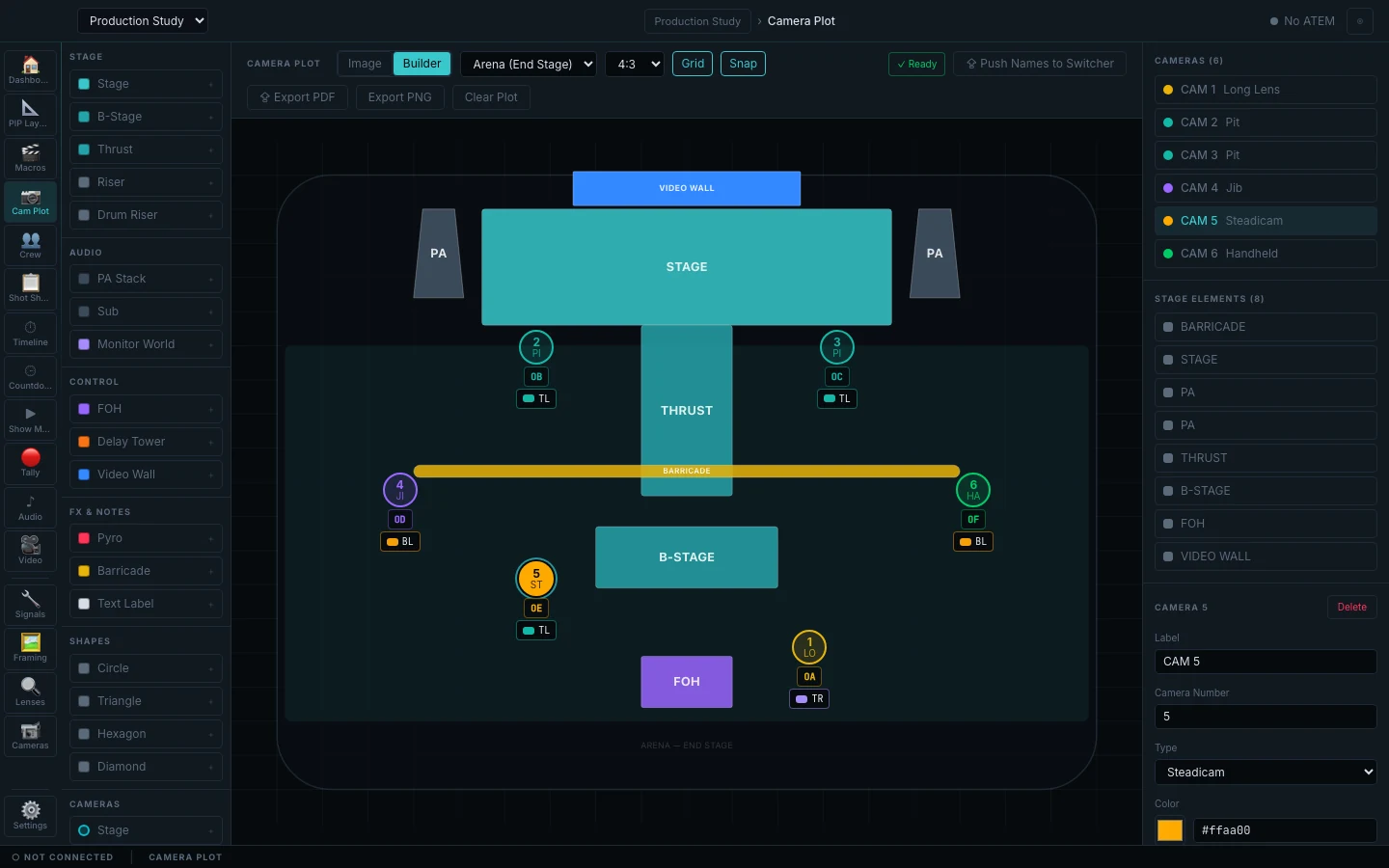
CueSwitcher — Camera Plot Builder
CueSwitcher's populated Camera Plot Builder for a synthetic production study: an arena end-stage canvas with video wall, stage, PA, thrust, barricade, B-stage and FOH elements; six placed cameras for long lens, pit, jib, steadicam and handheld positions; assigned operators, lenses and framing badges; a Ready preflight indicator; builder controls, element palette, camera list and the selected camera editor, while ATEM remains not connected.

Six cameras placed around a real stage plan, each with an operator, lens and primary framing. The preflight chip reads Ready because the plan is complete; the hardware state still reads No ATEM / NOT CONNECTED. This is planning evidence, not proof of a live switcher or camera-control session.

Every image on this page is a distinct capture of a real CueSwitcher surface. The show, songs, cues, operators and camera plan are synthetic. Signal, lens and shot-type pages are shipped reference data; the Camera Plot fixture uses the product's normal local persistence path. No switcher, camera or timecode hardware was attached.

05

Availability

In development, no published price

In Development — Private Validation

CueSwitcher is not on public sale.

CueSwitcher is being validated privately against real shows. Its commercial model is unresolved — whether the application itself is a one-time purchase or an annual licence, and whether additional protocol adapters are priced separately, has not been decided. No amount is quoted.

Signing and notarisation for macOS and Windows remain open, so there is no public installer today.

Platform
Desktop application for macOS and Windows.
Timecode input
Chase from an audio device, an audio file's embedded timecode, or MIDI.
Switcher adapters
ATEM, Ross, vMix and OBS. Further hardware adapters are not currently available.
Release state
In development. Code signing, notarisation and distribution are still external gates.